mybatis执行器

MyBatis就是针对JDBC做了一层封装,关于JDBC执行流程,详见:JDBC执行流程

主要涉及四部分:

  • 动态代理 MapperProxy
  • Sql会话 SqlSession
  • mybatis执行器 Executor
  • JDBC处理器 StatementHandler

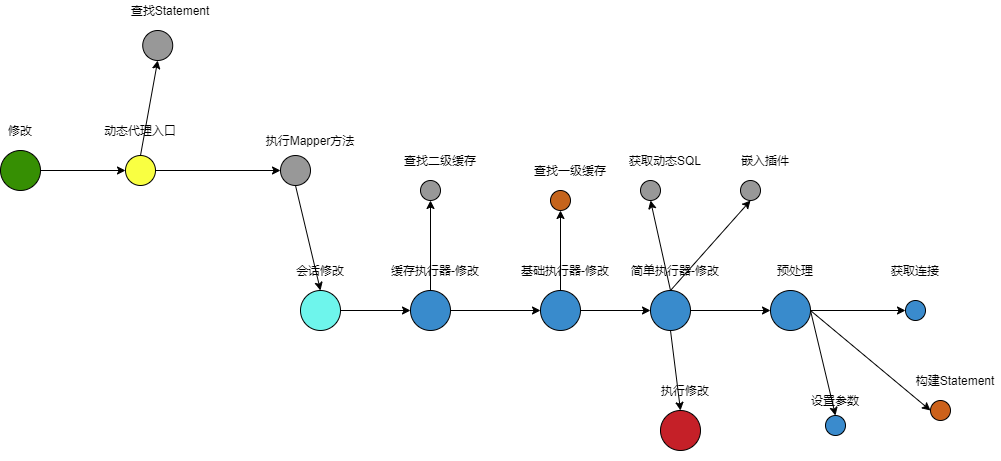
MyBatis执行流程:

MyBatis执行流程

MyBatis执行器

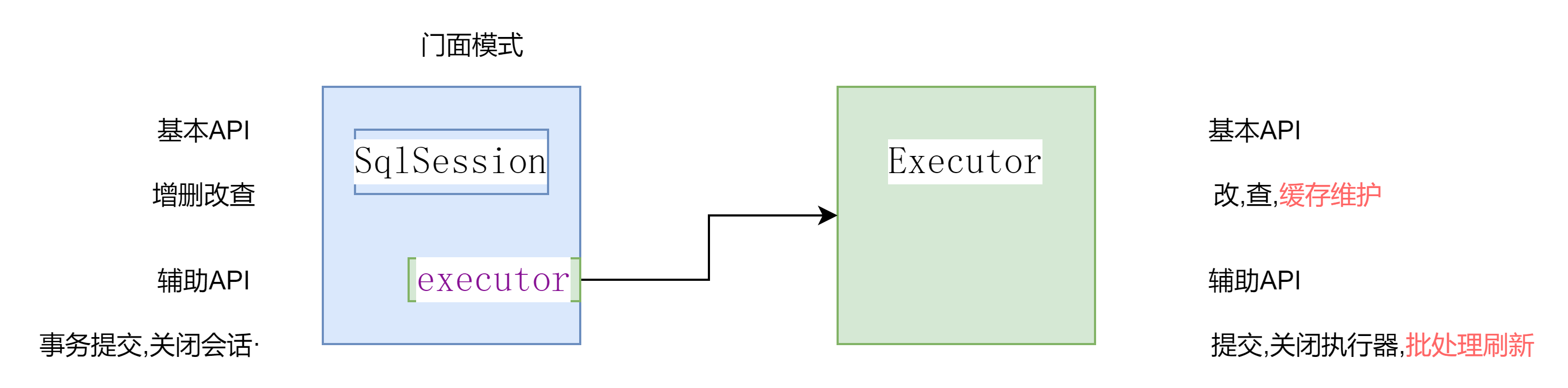
sqlsession与excutor

BaseExecutor

  • 公共功能:

    • 一级缓存
    • 获取连接
  • 方法:

    • query -> doQuery(接口)
    • update -> doUpdate(接口)
      BaseExecutorquery,update是具体方法,可以进行一级缓存操作,然后调用具体实现类的doQuerydoUpdate方法查询

SimpleExecutor

doQuery/doUpdate:
使用SimpleExecutor,无论执行的SQL是否一样每次都会进行预编译,每次都创建一个新的PrepareStatement

ReuseExecutor

doQuery/doUpdate:
使用ReuseExecutor,多次执行,若执行的SQL一样则会预编译一次

ReuseExecutor内部维护了一个HashMap(statementMap,以执行的sql为key,以Statement为value),如果执行的sql相同,则会命中statementMap中的数据,不会构建新的PrepareStatement,进而减少编译

BatchExecutor

doUpdate:
BatchExecutor只针对非查询语句(doUpdate)才有编译优化,若执行的sql与前一条执行的sql一致且与前一条对应的MapperStatement一致,才会开启编译优化
否则执行几次就会编译几次,创建新的PrepareStatement

编译

编译

1
g++ source.cpp  # a.out

以上的编译可以分为以下四步

预处理(Pre-Procession)

1
2
3
4
# -E 选项指示编译器仅对输入文件进行预处理
g++ -E source.cpp -o source.i
# or
cpp source.cpp target.cpp

纯编译(Compiling)

1
2
3
4
5
6
# -S 选项告诉编译器产生汇编语言后停止编译
# g++产生汇编文件的缺省名是.s
g++ -S source.cpp -o preprocessed.s
# or
cpp source.cpp preprocessed.cpp
/usr/lib/gcc/x86_64-linux-gnu/9/cc1plus preprocessed.cpp

c++filt 这个工具来帮助我们还原混淆符号对应的函数签名

汇编(Assembling)

1
2
3
4
# -c 选项告诉编译器仅把源代码转成机器语言的目标代码
g++ -c source.cpp -0 preprocessed.o
# or
as preprocessed.s -o preprocessed.o

file 查看文件类型
readelf 查看elf文件信息
nm 展示文件中符号

链接(Linking)

1
2
3
4
5
6
7
8
9
10
11
12
13
14
15
16
17
18
19
20
g++ preprocessed.o
# or
ld -static preprocessed.o \
/usr/lib/x86_64-linux-gnu/crt1.o \
/usr/lib/x86_64-linux-gnu/crti.o \
/usr/lib/gcc/x86_64-linux-gnu/9/crtbeginT.o \
-L/usr/lib/gcc/x86_64-linux-gnu/9 \
-L/usr/lib/x86_64-linux-gnu \
-L/lib/x86_64-linux-gnu \
-L/lib \
-L/usr/lib \
-lstdc++ \
-lm \
--start-group \
-lgcc \
-lgcc_eh \
-lc \
--end-group \
/usr/lib/gcc/x86_64-linux-gnu/9/crtend.o \
/usr/lib/x86_64-linux-gnu/crtn.o

g++重要参数

  1. -g

编译带调试信息的可执行文件

1
g++ -g test.cpp -o test
  1. -O[n]

代码优化,可选参数

  • -O 不做优化
  • -O1 默认优化
  • -O2 除O1外,进一步优化
  • -O3 更进一步的优化
1
g++ -O2 test.cpp
  1. -l/L
  • -l紧跟着就是库名,/lib,/usr/lib,/usr/local/lib里直接-l库名就能链接
  • -L紧跟着就是库所在目录
1
2
g++ -lglong test.cpp
g++ -L/home/temp/mytestlibfolder -lmytest test.cpp
  1. -I
    指定头文件搜索路径,/usr/include可以不需要指定
1
g++ -I/myinclude test.cpp
  1. -Wall
    打印警告信息
1
g++ -Wall test.cpp
  1. -w
    关闭警告信息
1
g++ -w test.cpp
  1. -std=[n]
    指定c++标准
1
g++ -std=c++11 test.cpp
  1. -D
    定义宏
1
g++ -DDEBUG test.cpp

创建和使用链接库

假设我们有这么一个程序,它的作用是用来交换数字,目录结构如下:

1
2
3
4
5
- include
- swap.h
- main.cpp
- src
- swap.cpp

静态库

1
2
3
4
5
6
7
8
9
10
11
12
13
# 生成:
# 进入src目录下
cd src
# 汇编生成swap.o文件
g++ swap.cpp -c -I../include
# 生成静态链接库
ar rs libswap.a swap.o

# 使用:
# 回到上级目录
cd ..
# 链接,生成可执行文件
g++ main.cpp -Iinclude -Lsrc -lswap -o staticmain

动态库

1
2
3
4
5
6
7
8
9
10
11
12
13
14
# 生成:
# 进入src目录下
cd src
# 汇编生成swap.o文件
g++ swap.cpp -I../include -fPIC -shared -o libswap.so
# 上面命令等价于
# g++ swap.cpp -I../include -c -fPIC
# g++ -shared -o libswap.so swap.o

# 使用:
# 回到上级目录
cd ..
# 链接,生成可执行文件
g++ main.cpp -Iinclude -Lsrc -lswap -o sharemain

运行动态库的程序时,指定库路径

1
2
# sharemain.so在src目录下
LD_LIBRARY_PATH=src ./sharemain

参考

  1. 编译过程概览

设计模式

门面模式(Facade Pattern)

  • 简介:
    门面模式为封装的对象定义了一个的接口,所有针对封装对象的操作都通过门面接口去实现

  • 示例:

    • MyBatis中SqlSession与Executor
      SqlSession是门面接口,Executor是被封装的对象,所有访问执行器Excutor的操作都需要通过SqlSession定义的新接口去执行

模板模式(Template Pattern)

  • 简介:
    一个抽象类公开定义了执行它的方法的方式/模板。它的子类可以按需要重写方法实现,但调用将以抽象类中定义的方式进行

  • 示例:

    • 面向接口编程就是典型的模板模式

    • MyBatis提供了3种不同的Executor,分别为SimpleExecutor、ResueExecutor、BatchExecutor,这些Executor都继承至BaseExecutor,BaseExecutor中定义的方法的执行流程及通用的处理逻辑,具体的方法由子类来实现,是典型的模板方法模式的应用

享元模式(Flyweight Pattern)

  • 简介:
    主要用于减少创建对象的数量,以减少内存占用和提高性能

  • 示例:

    • Mybatis的Configration缓存了MappedStatement对象,当使用时直接从缓存中取出

装饰器模式(Decorater Pattern)

  • 简介:
    创建了一个装饰类,用来包装原有的类,并在保持类方法签名完整性的前提下,提供了额外的功能
    允许向一个现有的对象添加新的功能,同时又不改变其结构

  • 示例:

    • Mybatis中创建了CachingExecutor作为装饰类,包装了SimpleExecutor,ReuseExecutor和BatchExecutor,在保持方法签名不变的前提下,提供了缓存功能

数据库事务

显式事务与隐式事务

  • 对于单条SQL语句,数据库系统自动将其作为一个事务执行,这种事务被称为隐式事务
  • 手动把多条SQL语句作为一个事务执行,使用BEGIN开启一个事务,使用COMMIT提交一个事务,这种事务被称为显式事务

事务的四个特性

原子性

将所有SQL作为原子工作单元执行,要么全部执行,要么全部不执行

一致性

事务完成后,数据状态的改变是一致的,结果是完整的

隔离性

事务与事务试图操纵同样数据时,他们之间是互相隔离的
如果有多个事务并发执行,每个事务作出的修改必须与其他事务隔离

持久性

事务提交后,数据结果会永久保存,也即完成数据持久化,即使断电数据也已经保存

隔离级别与数据读取问题

脏读(Read Uncommitted)

在这种隔离级别下,一个事务会读到另一个事务更新后但未提交的数据,如果另一个事务回滚,那么当前事务读到的数据就是脏数据

例如:
A事务修改了一条数据,但是未提交修改,此时A事务对数据的修改对其他事务是可见的,B事务中能够读取A事务未提交的修改。一旦A事务回滚,B事务中读取的就是不正确的数据

不可重复读(Read Committed)

一个事务先后采用相同的策略读取数据,发现两次读取的数据不一致

详细解释:在一个事务内,多次读同一数据,在这个事务还没有结束时,如果另一个事务恰好修改了这个数据,那么,在第一个事务中,两次读取的数据就可能不一致

例如:

  1. A事务中读取一行数据
  2. B事务中修改了该行数据
  3. A事务中再次读取该行数据将得到不同的结果

幻读(Repeatable Read)

一个事务按照相同的条件查询数据,却发现其他事务插入了满足其查询条件的数据

详细解释:在一个事务中,第一次查询某条记录,发现没有,但是,当试图更新这条不存在的记录时,竟然能成功,并且,再次读取同一条记录,它就神奇地出现了

例如:

  1. A事务中通过WHERE条件读取若干行
  2. B事务中插入了符合条件的若干条数据
  3. A事务中通过相同的条件再次读取数据时将会读取到B事务中插入的数据。

此外隔离级别还有Serializable,最严格的隔离级别,但效率最低

参考

  1. 事务
  2. MyBatis 3源码深度解析/江荣波

JDBC 学习

JDBC是什么

数据库有很多,如果想通过JAVA访问数据库,那么需要通过JDBC接口,借用厂商提供的数据库JDBC驱动来访问数据库

JDBC驱动其实就是实现了JAVA接口的一组jar包

JDBC执行流程

JDBC API简介

建立数据源连接

  • DriverManager 完全由JDBC API实现的驱动管理类
  • DataSource 更灵活,由JDBC驱动程序提供
    • ConnectionPoolDataSource 支持缓存和复用Connection对象,这样能够在很大程度上提升应用性能和伸缩性。
    • XADataSource 该实例返回的Connection对象能够支持分布式事务。

执行SQL语句

调用ResultSet对象的getMetaData()方法获取结果集元数据信息。该方法返回一个ResultSetMetaData对象,我们可以通过ResultSetMetaData对象获取结果集中所有的字段名称、字段数量、字段数据类型等信息

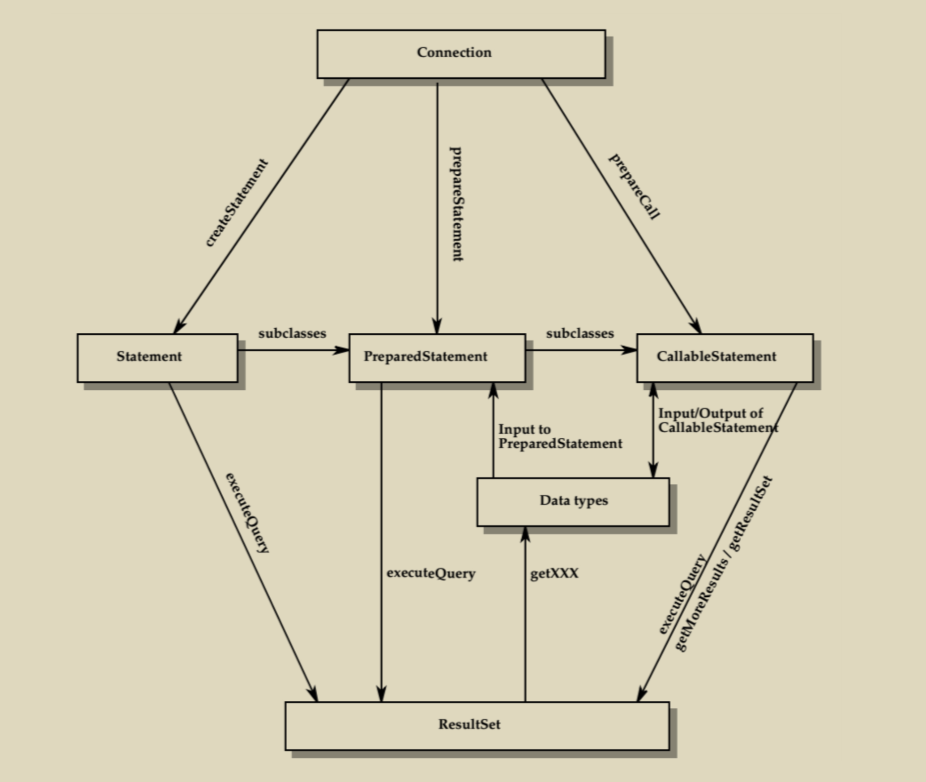
java.sql包

java.sql核心类关系,来自MyBatis 3源码深度解析/江荣波

Wrapper

许多JDBC驱动程序提供超越传统JDBC的扩展,为了符合JDBC API规范,驱动厂商可能会在原始类型的基础上进行包装,Wrapper接口为使用JDBC的应用程序提供访问原始类型的功能,从而使用JDBC驱动中一些非标准的特性

  • unwrap()方法用于返回未经过包装的JDBC驱动原始类型实例,我们可以通过该实例调用JDBC驱动中提供的非标准的方法
  • isWrapperFor()方法用于判断当前实例是否是JDBC驱动中某一类型的包装类型

例如:

1
2
3
4
5
6
7
8

Statement statement = connection.createStatement();
Class clazz = Class.forname("oracle.jdbc.OracleStatement");
if(statement.isWrapperFor(clazz)){
OracleStatement oracleStatement = (OracleStatement)stmt.unwrap(clazz);
// do otherthing
}

javax.sql包

  • DataSource接口
    无需像DriverManager似的硬编码
  • PooledConnection接口
    连接复用
  • XADataSource、XAResource和XAConnection接口
    分布式事务支持
  • RowSet接口
    RowSet就相当于数据库表数据在应用程序内存中的映射

示例

通过JDBC访问MySql

环境声明:

  • mysql数据库地址:10.88.88.2:3306
  • mysql版本(select version()):8.0.26

前期准备

1.新建一个空的maven工程,pom中引入最新的mysql-connector-java

1
2
3
4
5
6
7
<dependency>
<groupId>mysql</groupId>
<artifactId>mysql-connector-java</artifactId>
<version>8.0.26</version>
<!-- scope为runtime,避免编写时与java自带jdbc接口混淆 -->
<scope>runtime</scope>
</dependency>

2.数据库初始化

1
2
3
4
5
6
7
8
9
10
11
12
13
14
15
16
17
18
19
20
21
22
23
24
25
26
27
28
29
30
31
32
33
-- 创建数据库learjdbc:
DROP DATABASE IF EXISTS learnjdbc;
CREATE DATABASE learnjdbc;

-- 创建登录用户learn/口令learnpassword
CREATE USER IF NOT EXISTS learn@'%' IDENTIFIED BY 'learnpassword';
GRANT ALL PRIVILEGES ON learnjdbc.* TO learn@'%' WITH GRANT OPTION;
FLUSH PRIVILEGES;

-- 创建表students:
USE learnjdbc;
CREATE TABLE students (
id BIGINT AUTO_INCREMENT NOT NULL,
name VARCHAR(50) NOT NULL,
gender TINYINT(1) NOT NULL,
grade INT NOT NULL,
score INT NOT NULL,
PRIMARY KEY(id)
) Engine=INNODB DEFAULT CHARSET=UTF8;

-- 插入初始数据:
INSERT INTO students (name, gender, grade, score) VALUES ('小明', 1, 1, 88);
INSERT INTO students (name, gender, grade, score) VALUES ('小红', 1, 1, 95);
INSERT INTO students (name, gender, grade, score) VALUES ('小军', 0, 1, 93);
INSERT INTO students (name, gender, grade, score) VALUES ('小白', 0, 1, 100);
INSERT INTO students (name, gender, grade, score) VALUES ('小牛', 1, 2, 96);
INSERT INTO students (name, gender, grade, score) VALUES ('小兵', 1, 2, 99);
INSERT INTO students (name, gender, grade, score) VALUES ('小强', 0, 2, 86);
INSERT INTO students (name, gender, grade, score) VALUES ('小乔', 0, 2, 79);
INSERT INTO students (name, gender, grade, score) VALUES ('小青', 1, 3, 85);
INSERT INTO students (name, gender, grade, score) VALUES ('小王', 1, 3, 90);
INSERT INTO students (name, gender, grade, score) VALUES ('小林', 0, 3, 91);
INSERT INTO students (name, gender, grade, score) VALUES ('小贝', 0, 3, 77);

3.测试连接

1
2
3
4
5
6
7
8
9
10
11
12
13
String JDBC_URL = "jdbc:mysql://10.88.88.2:3306/learnjdbc?useSSL=false&characterEncoding=utf8&allowPublicKeyRetrieval=true";
String JDBC_USER = "learn";
String JDBC_PASSWORD = "learnpassword";
Connection connection = null;
try {
connection = DriverManager.getConnection(JDBC_URL, JDBC_USER, JDBC_PASSWORD);
} catch (SQLException throwables) {
throwables.printStackTrace();
}finally {
if(null != connection){
connection.close();
}
}

4.问题解决

  • Public Key Retrieval is not allowed

连接后面添加allowPublicKeyRetrieval=true
MySQL 8.0 Public Key Retrieval is not allowed 错误的解决方法

  • Access denied for user ‘learn‘@’172.17.0.1’ (using password: YES)

密码错了,仔细检查java代码中的密码

JDBC查询

1
2
3
4
5
6
7
8
9
10
11
12
13
14
15
16
17
18
19
ResultSet resultSet = null;
try (Connection connection = DriverManager.getConnection(JDBCConstant.JDBC_URL,JDBCConstant.JDBC_USER,JDBCConstant.JDBC_PASSWORD);
PreparedStatement preparedStatement = connection.prepareStatement("SELECT id, grade, name, gender FROM students WHERE gender=?")){
preparedStatement.setObject(1,1);
resultSet = preparedStatement.executeQuery();
while (resultSet.next()){
long id = resultSet.getLong(1); // 注意:索引从1开始
long grade = resultSet.getLong(2);
String name = resultSet.getString(3);
int gender = resultSet.getInt(4);
System.out.println(String.format("id:%s grade:%s name:%s gender:%s",id,grade,name,gender));
}
} catch (SQLException throwables) {
throwables.printStackTrace();
}finally {
if(null != resultSet){
resultSet.close();
}
}

这里使用PreparedStatement,这样它会自动帮我们进行’转义’功能,防止SQL注入

JDBC更新

JDBC插入
  • 插入时附带主键id
1
2
3
4
5
6
7
8
9
10
11
try (Connection conn = DriverManager.getConnection(JDBCConstant.JDBC_URL, JDBCConstant.JDBC_USER, JDBCConstant.JDBC_PASSWORD);
PreparedStatement ps = conn.prepareStatement("INSERT INTO students (id, grade, name, gender, score) VALUES (?,?,?,?,?)")){
int index = 1;
ps.setObject(index++, 999); // 注意:索引从1开始
ps.setObject(index++, 1); // grade
ps.setObject(index++, "Bob"); // name
ps.setObject(index++, 0); // gender
ps.setObject(index++, 100); // score
int n = ps.executeUpdate(); // 1
System.out.println(String.format("flag:%s",n));
}
  • 使用数据库自动生成id
1
2
3
4
5
6
7
8
9
10
11
12
13
14
15
16
17
try (Connection conn = DriverManager.getConnection(JDBCConstant.JDBC_URL, JDBCConstant.JDBC_USER, JDBCConstant.JDBC_PASSWORD);
PreparedStatement ps = conn.prepareStatement("INSERT INTO students (grade, name, gender, score) VALUES (?,?,?,?)", Statement.RETURN_GENERATED_KEYS)){
int index = 1;
ps.setObject(index++, 2); // grade
ps.setObject(index++, "Bob2"); // name
ps.setObject(index++, 0); // gender
ps.setObject(index++, 90); // score
int n = ps.executeUpdate(); // 1
System.out.println(String.format("flag:%s",n));
// 通过`getGeneratedKeys`获取自动生成的id
try (ResultSet resultSet = ps.getGeneratedKeys()) {
if (resultSet.next()){
long id = resultSet.getLong(1);
System.out.println(String.format("id:%s",id));
}
}
}
JDBC更新
1
2
3
4
5
6
7
8
9
10
try (Connection conn = DriverManager.getConnection(JDBCConstant.JDBC_URL, JDBCConstant.JDBC_USER, JDBCConstant.JDBC_PASSWORD);
PreparedStatement ps = conn.prepareStatement("UPDATE students SET name=? WHERE id=?")){
int index = 1;
ps.setObject(index++, "Bob"); // 注意:索引从1开始
ps.setObject(index++, 999);
int n = ps.executeUpdate(); // 返回更新的行数
System.out.println(String.format("更新的行数:%s",n));
} catch (SQLException throwables) {
throwables.printStackTrace();
}
JDBC删除
1
2
3
4
5
6
7
8
9
try (Connection conn = DriverManager.getConnection(JDBCConstant.JDBC_URL, JDBCConstant.JDBC_USER, JDBCConstant.JDBC_PASSWORD);
PreparedStatement ps = conn.prepareStatement("DELETE FROM students WHERE id=?")){
int index = 1;
ps.setObject(index++, 999); // 注意:索引从1开始
int n = ps.executeUpdate(); // 删除的行数
System.out.println(String.format("删除的行数:%s",n));
} catch (SQLException throwables) {
throwables.printStackTrace();
}

JDBC事务

1
2
3
4
5
6
7
8
9
10
11
12
13
14
15
16
17
18
19
20
21
22
23
24
25
26
27
28
29
30
31
32
33
PreparedStatement ps = null;
Connection connection = null;
try {
connection = DriverManager.getConnection(JDBCConstant.JDBC_URL,JDBCConstant.JDBC_USER,JDBCConstant.JDBC_PASSWORD);
boolean autoCommit = connection.getAutoCommit();
System.out.println(String.format("autoCommit:%s",autoCommit));
connection.setAutoCommit(false);
ps = connection.prepareStatement("UPDATE students SET name=? WHERE id=?");
int index = 1;
ps.setObject(index++, "Bob"); // 注意:索引从1开始
ps.setObject(index++, 999);
int n = ps.executeUpdate(); // 返回更新的行数
System.out.println(String.format("更新的行数:%s",n));
ps.close();
ps = connection.prepareStatement("UPDATE students SET name=? WHERE id=?");
index = 1;
ps.setObject(index++, "Bob999"); // 注意:索引从1开始
ps.setObject(index++, 999);
n = ps.executeUpdate(); // 返回更新的行数
System.out.println(String.format("更新的行数:%s",n));
connection.commit();
connection.setAutoCommit(true);
} catch (SQLException throwables) {
connection.rollback();
throwables.printStackTrace();
}finally {
if(null != connection){
connection.close();
}
if(null != ps){
ps.close();
}
}

JDBC Batch

1
2
3
4
5
6
7
8
9
10
11
12
13
14
15
try (PreparedStatement ps = conn.prepareStatement("INSERT INTO students (name, gender, grade, score) VALUES (?, ?, ?, ?)")) {
// 对同一个PreparedStatement反复设置参数并调用addBatch():
for (Student s : students) {
ps.setString(1, s.name);
ps.setBoolean(2, s.gender);
ps.setInt(3, s.grade);
ps.setInt(4, s.score);
ps.addBatch(); // 添加到batch
}
// 执行batch:
int[] ns = ps.executeBatch();
for (int n : ns) {
System.out.println(n + " inserted."); // batch中每个SQL执行的结果数量
}
}

JDBC 连接池

这里使用HikariCP

1
2
3
4
5
<dependency>
<groupId>com.zaxxer</groupId>
<artifactId>HikariCP</artifactId>
<version>4.0.3</version>
</dependency>
1
2
3
4
5
6
7
8
9
10
11
12
13
14
15
16
17
18
19
20
ResultSet resultSet = null;
DataSource dataSource = JDBCConstant.getDataSource();
try (Connection connection = dataSource.getConnection();
PreparedStatement preparedStatement = connection.prepareStatement("SELECT id, grade, name, gender FROM students WHERE gender=?")){
preparedStatement.setObject(1,1);
resultSet = preparedStatement.executeQuery();
while (resultSet.next()){
long id = resultSet.getLong(1); // 注意:索引从1开始
long grade = resultSet.getLong(2);
String name = resultSet.getString(3);
int gender = resultSet.getInt(4);
System.out.println(String.format("id:%s grade:%s name:%s gender:%s",id,grade,name,gender));
}
} catch (SQLException throwables) {
throwables.printStackTrace();
}finally {
if(null != resultSet){
resultSet.close();
}
}

参考

1.JDBC编程
2.MyBatis源码解析大合集
3.MyBatis 3源码深度解析/江荣波

为VUE2工程添加JEST单元测试

现有一vue2工程(vue初始化工程,仅有HelloWorld.vue),需要给它添加jest单元测试

添加unit-jest

使用命令

1
vue add unit-jest

给已有的工程添加单元测试

测试

可以观察到命令执行完成后

  1. 会在src/tests/unit产生一个example.spec.js的文件,这个是测试HelloWorld.vue这个单VUE组件的
  2. package.jsondevDependencies中会添加涉及vue jest的依赖,scripts中会添加一个新的test:unit的命令

使用

1
npm run test:unit

就可以单测HelloWorld.vue,这个组件

部分特殊处理

针对webpack路径别名的配置

经过我的实测,jest单测是支持@路径别名的(得益于node_modules\@vue\cli-service\lib\config\base.js)
但是针对其他的别名,jest就不怎么支持了,需要我们自行配置。例如:

vue.config.js中配置了如下别名:

1
2
3
4
5
6
7
8
9
10
11
12
13
const path = require("path");
function resolve(dir) {
return path.join(__dirname, dir);
}

module.exports = {
chainWebpack: config => {
config.resolve.alias
.set("assets", resolve("src/assets"))
.set("components", resolve("src/components"))
.set("public", resolve("public"));
},
}

那么在jest.config.js中需要配置moduleNameMapper

1
2
3
4
5
6
7
module.exports = {
moduleNameMapper: {
"^assets(.*)$": "<rootDir>/src/assets$1",
"^components(.*)$": "<rootDir>/src/components$1",
"^public(.*)$": "<rootDir>/public$1"
}
}

针对引入的样式文件与css模块

根据vue-test-utils官网介绍,当运行在jsdom上时,只能探测到内联样式

我们有以下组件:

1
2
3
4
5
6
7
8
9
10
11
12
13
14
15
16
17
18
<template>
<div class="msg" style="color:green;">
{{msg}}
</div>
</template>

<script>
import '@/src/css/style-msg.css'
export default {
name: 'StyleMsg',
props: {
msg:{
type:String,
default:''
}
}
}
</script>

当单元测试的组件中有引入的css样式时,可以这么做忽略样式配置

这么做是模拟了css的处理,本质还是没有引入样式

参考:

使用 webpack

jeecg 2.4.6 Online表单开发 数据库配置+crud

表单保存

  • 请求URL:
1
http://localhost:8080/jeecg-boot/online/cgform/api/editAll
  • 请求方法:

PUT

  • 请求参数:
1
2
3
4
5
6
7
8
9
10
11
12
13
14
15
16
17
18
19
20
21
22
23
24
25
26
27
28
29
30
31
32
33
34
35
36
37
38
39
40
41
42
43
44
45
46
47
48
49
50
51
52
53
54
55
56
57
58
59
60
61
62
63
64
65
66
67
68
69
70
71
72
73
74
75
76
77
78
79
80
81
82
83
84
85
86
87
88
{
"head": {
"id": "3d028152d85948a8b021aa8f13088dcd",
"tableName": "flcm_product",
"tableType": 2,
"tableVersion": 1,
"tableTxt": "基金产品",
"isCheckbox": "Y",
"isDbSynch": "N",
"isPage": "Y",
"isTree": "N",
"idSequence": null,
"idType": "UUID",
"queryMode": "single",
"relationType": null,
"subTableStr": null,
"tabOrderNum": null,
"treeParentIdField": null,
"treeIdField": null,
"treeFieldname": null,
"formCategory": "bdfl_include",
"formTemplate": "1",
"themeTemplate": "normal",
"formTemplateMobile": null,
"extConfigJson": "{\"reportPrintShow\":0,\"reportPrintUrl\":\"\",\"joinQuery\":0,\"modelFullscreen\":0,\"modalMinWidth\":\"\"}",
"updateBy": null,
"updateTime": null,
"createBy": "admin",
"createTime": "2021-09-11 20:04:12",
"copyType": 0,
"copyVersion": null,
"physicId": null,
"hascopy": 0,
"scroll": 1,
"taskId": null,
"isDesForm": "N",
"desFormCode": ""
},
"fields": [
{
"id": "eed836ca2e974802caa1d6b98e3f4333",
"dbFieldName": "id",
"dbFieldTxt": "主键",
"queryDictField": "",
"queryDictText": "",
"queryDefVal": "",
"queryDictTable": "",
"queryConfigFlag": "0",
"mainTable": "",
"mainField": "",
"fieldHref": "",
"dictField": "",
"dictText": "",
"fieldMustInput": "0",
"dictTable": "",
"fieldLength": "120",
"fieldDefaultValue": "",
"fieldExtendJson": "",
"converter": "",
"isShowForm": "0",
"isShowList": "0",
"sortFlag": "0",
"isReadOnly": "1",
"fieldShowType": "text",
"isQuery": "0",
"queryMode": "single",
"dbLength": "36",
"dbPointLength": "0",
"dbDefaultVal": "",
"orderNum": 1,
"dbType": "string",
"dbIsKey": "1",
"dbIsNull": "0",
"order_num": 0
},
// 其他字段舍弃
],
"indexs": [
{
"id": "c92fd1cd8c8f1aaa264ee628e8b73f97",
"indexName": "uk_code",
"indexField": "code",
"indexType": "unique"
}
],
"deleteFieldIds": [],
"deleteIndexIds": []
}
  • 后台处理
1
2
# 这里应该是对实现类做了混淆
org.jeecg.modules.online.cgform.c.a#b(org.jeecg.modules.online.cgform.model.a)

数据库同步

  • 请求URL:
1
http://localhost:8080/jeecg-boot/online/cgform/api/doDbSynch/3d028152d85948a8b021aa8f13088dcd/normal

其中,3d028152d85948a8b021aa8f13088dcd是表单code,normal是同步方式

normal:普通同步,force:强制同步,这两个同步方式的唯一区别是是否产生drop语句

  • 请求方法:

POST

  • 请求参数:

  • 后台处理
1
2
# 这里应该是对实现类做了混淆
org.jeecg.modules.online.cgform.c.a#h

数据增加

  • 请求URL:
1
http://localhost:8080/jeecg-boot/online/cgform/api/form/3d028152d85948a8b021aa8f13088dcd?tabletype=1

其中,3d028152d85948a8b021aa8f13088dcd是表单code

  • 请求方法:

POST

  • 请求参数:
1
2
3
4
5
{
"name":"产品名称TEST#1",
"code":"产品代码TEST#1",
"duration":1
}
  • 后台处理
1
2
# 这里应该是对实现类做了混淆
org.jeecg.modules.online.cgform.c.a#a(java.lang.String, com.alibaba.fastjson.JSONObject, javax.servlet.http.HttpServletRequest)

这里其实就是根据配置生成insert语句

数据删除

  • 请求URL:
1
http://localhost:8080/jeecg-boot/online/cgform/api/form/3d028152d85948a8b021aa8f13088dcd/1436700316685357058

其中,3d028152d85948a8b021aa8f13088dcd是表单code,1436700316685357058是数据id

  • 请求方法:

DELETE

  • 请求参数:

  • 后台处理
1
2
# 这里应该是对实现类做了混淆
org.jeecg.modules.online.cgform.c.a#f

这里其实就是根据配置生成delete语句/或逻辑删除

数据修改

  • 请求URL:
1
http://localhost:8080/jeecg-boot/online/cgform/api/form/3d028152d85948a8b021aa8f13088dcd?tabletype=1

其中,3d028152d85948a8b021aa8f13088dcd是表单code

  • 请求方法:

PUT

  • 请求参数:
1
2
3
4
5
6
{
"duration":123,
"code":"code",
"name":"name",
"id":"1437763464737640449"
}
  • 后台处理
1
2
# 这里应该是对实现类做了混淆
org.jeecg.modules.online.cgform.c.a#a(java.lang.String, com.alibaba.fastjson.JSONObject)

这里其实就是根据配置生成update语句

数据查询

  • 请求URL:
1
http://localhost:8080/jeecg-boot/online/cgform/api/form/3d028152d85948a8b021aa8f13088dcd?tabletype=1

其中,3d028152d85948a8b021aa8f13088dcd是表单code

  • 请求方法:

PUT

  • 请求参数:
1
_t=1631624511&column=id&order=desc&pageNo=1&pageSize=10&superQueryMatchType=and
  • 后台处理
1
2
# 这里应该是对实现类做了混淆
org.jeecg.modules.online.cgform.c.a#a(java.lang.String, javax.servlet.http.HttpServletRequest)

开源项目vue-form-making分析

vue-form-making是基于 vue2 和 element-ui 实现的可视化表单设计器。
其分为开源版本与收费版本。本文仅分析他的开源版本。分析版本为:1.2.10

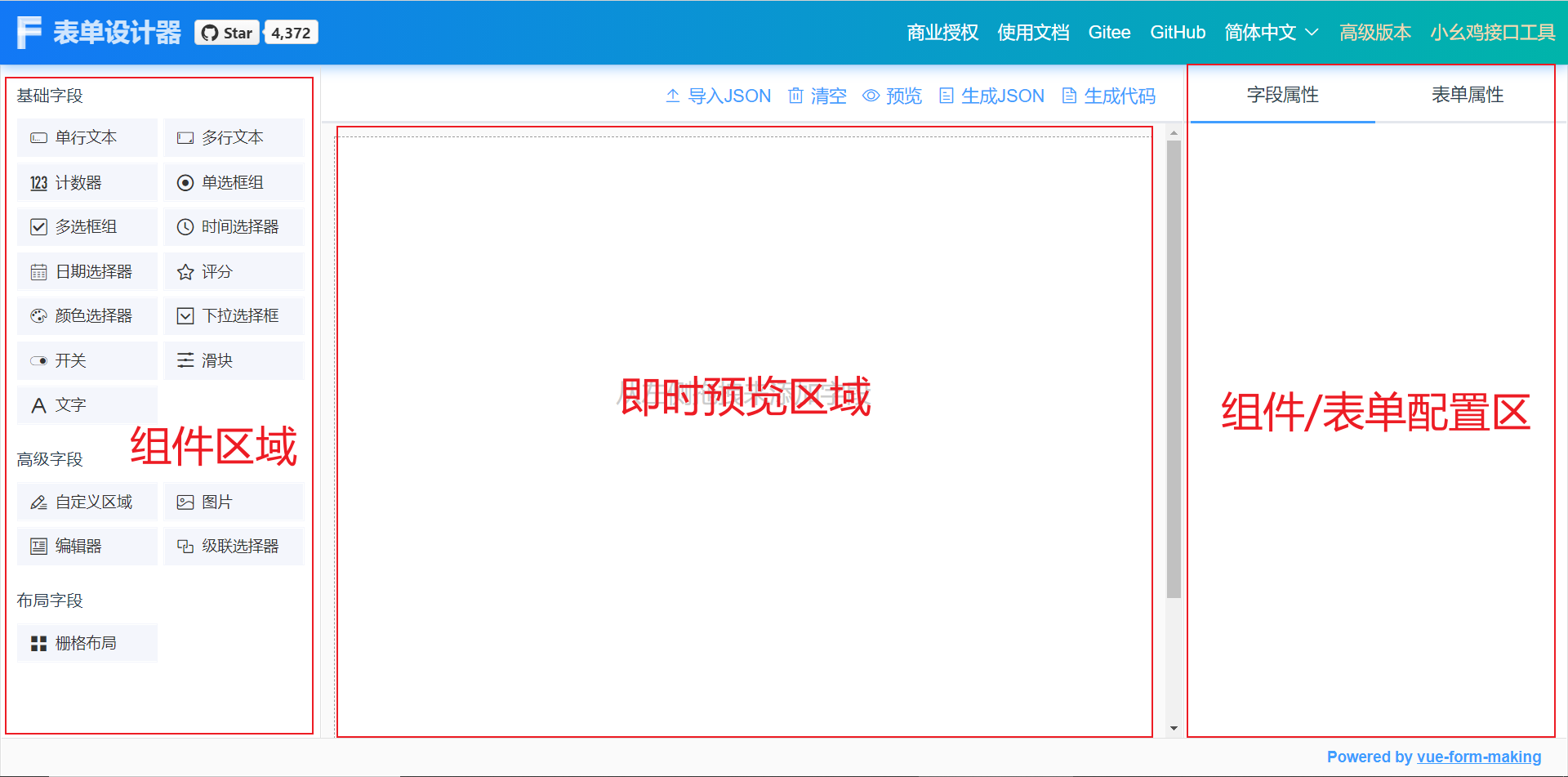
界面预览

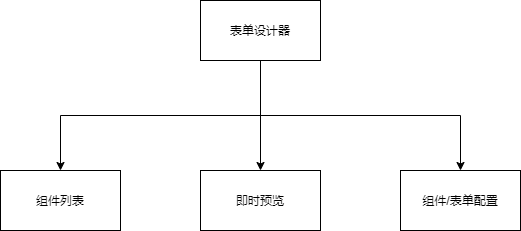
界面结构

表单设计器界面结构.drawio.png

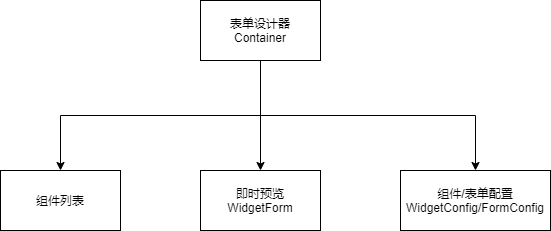
名称与文件路径关系

名称 对应文件路径
Container /src/components/Container.vue
WidgetConfig /src/components/WidgetConfig.vue
FormConfig /src/components/FormConfig.vue
WidgetForm /src/components/WidgetForm.vue
WidgetFormItem /src/components/WidgetFormItem.vue
GenerateForm /src/components/GenerateForm.vue
GenerateFormItem /src/components/GenerateFormItem.vue

各文件功能分析

表单设计器各文件功能.drawio.png

渲染时各文件功能

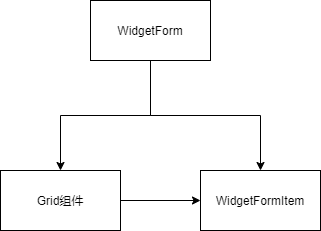
  1. 即时预览时

表单设计器即时预览时各文件功能.drawio.png

WidgetFormItem为即时预览时组件最终渲染器。

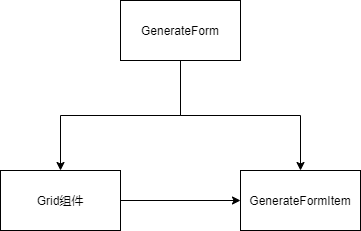
  1. 渲染时

表单设计器界面渲染时各文件功能.drawio.png

GenerateFormItem为渲染时组件最终渲染器。

渲染后数据改变流程

内部组件

表单设计器界面渲染时数据改变流程.drawio.png

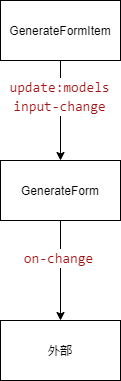
  1. GenerateFormItem中组件的数据dataModel发生改变,通过update:models修改上层组件的models数据,通过input-change事件触发GenerateFormonInputChange方法
  2. GenerateFormonInputChange方法中通过on-change方法对外暴露组件数据改变事件

外部组件

引入GenerateForm使用value props 传入外部数据,GenerateFormGenerateFormItem中通过props一层层向下传递,每一层通过watch监听数据

怎样给npm scripts发送命令行参数

当我使用hexo创建一片新的文章时,需要使用命令,比如本篇文章就需要使用命令

1
hexo new page --path /_posts/how_to_send_args_to_npm_scripts how_to_send_args_to_npm_scripts

但我不想每次创建一篇新文章时都要敲这么长一串命令,而且命令中文章的标题how_to_send_args_to_npm_scripts是重复的
那么该怎么做呢?

将命令放入package.json

package.jsonscripts下面可以放置该命令

1
2
3
4
5
6
7
8
{
// 其他配置项忽略
"scripts": {
//其他命令忽略
"new":"hexo new page --path /_posts/how_to_send_args_to_npm_scripts how_to_send_args_to_npm_scripts"
},
// 其他配置项忽略
}

但是我每次生成的文章标题都是不一样的,这该如何处理?

使scripts中命令动态化

我希望当我使用npm run new这个命令时,能供传入新创建的文章标题以及文件名,这就要使用命令行参数解析功能,可以将scripts中命令改为

1
2
3
4
5
6
7
8
9
10
{
// 其他配置项忽略
"scripts": {
//其他命令忽略
//$npm_config_path $npm_config_title只在bash终端下有效
//windows用户需要使用 %npm_config_path% %npm_config_title%
"new":"hexo new page --path /_posts/$npm_config_path $npm_config_title"
},
// 其他配置项忽略
}

这样我只需使用npm run new --path=how_to_send_args_to_npm_scritps --title=怎样向NPMScripts脚本发送参数就可以生成一篇名为how_to_send_args_to_npm_scritps.md标题叫怎样向NPMScripts脚本发送参数的文章

进一步精简命令

可以新建以下脚本./scripts/newPage.js

1
2
3
4
5
6
7
8
9
10
11
12
13
14
15
16
17
18
19
const exec = require('child_process').exec;

const args = process.argv.slice(2)


console.log('传入参数',args)

if(args.length != 2){
return
}

const cmdStr = `hexo new page --path /_posts/${args[0]} "${args[1]}"`
exec(cmdStr, function(err,stdout,stderr){
if(err) {
console.log(stderr);
} else {
console.log(stdout);
}
});

scriptsnew对应的脚本改为

1
2
3
4
5
6
7
8
{
// 其他配置项忽略
"scripts": {
//其他命令忽略
"new":"node ./scripts/newPage.js"
},
// 其他配置项忽略
}

使用npm run new how_to_send_args_to_npm_scritps 怎样向NPMScripts脚本发送参数就可以生成一篇名为how_to_send_args_to_npm_scritps.md标题叫怎样向NPMScripts脚本发送参数的文章

参考

  1. npm scripts 使用指南

jeecg 2.4.6 如何校验验证码

这里主要分析jeecg 2.4.6如何校验登录

流程

生成验证码

前端缓存发送生成验证码请求时时间戳currdatetime

后端缓存

后端将验证码小写后+时间戳 md5后作为key,小写验证码作为value存redis,缓存时长60秒

1
2
3
4
5
6
7
8
//org.jeecg.modules.system.controller.LoginController#randomImage
//生成随机验证码
String code = RandomUtil.randomString(BASE_CHECK_CODES,4);
String lowerCaseCode = code.toLowerCase();
//验证码小写后+时间戳 md5后作为key
String realKey = MD5Util.MD5Encode(lowerCaseCode+key, "utf-8");
//缓存redis
redisUtil.set(realKey, lowerCaseCode, 60);

登录校验

登录地址:

http://localhost:8080/jeecg-boot/sys/login

请求参数:

1
2
3
4
5
6
7
8
9
{
"username":"admin",
"password":"123456",
// 输入的验证码
"captcha":"UKwW",
// 缓存时间戳
"checkKey":1630844796721,
"remember_me":true
}

输入的验证码+时间戳 md5后作为key,从redis里面获取验证码,验证码不为空且输入的验证码与redis里面获取的验证码一致,即为验证通过

1
2
3
4
5
6
7
8
9
10
11
12
13
14
15
16
17
//org.jeecg.modules.system.controller.LoginController#login
//获取输入的验证码
String captcha = sysLoginModel.getCaptcha();
if(captcha==null){
result.error500("验证码无效");
return result;
}
String lowerCaseCaptcha = captcha.toLowerCase();
//输入的验证码+时间戳 md5后作为key
String realKey = MD5Util.MD5Encode(lowerCaseCaptcha+sysLoginModel.getCheckKey(), "utf-8");
//获取redis里面缓存的验证码
Object checkCode = redisUtil.get(realKey);
//当进入登录页时,有一定几率出现验证码错误 #1714
if(checkCode==null || !checkCode.toString().equals(lowerCaseCaptcha)) {
result.error500("验证码错误");
return result;
}