JDBC 学习

JDBC是什么

数据库有很多,如果想通过JAVA访问数据库,那么需要通过JDBC接口,借用厂商提供的数据库JDBC驱动来访问数据库

JDBC驱动其实就是实现了JAVA接口的一组jar包

JDBC执行流程

JDBC API简介

建立数据源连接

  • DriverManager 完全由JDBC API实现的驱动管理类
  • DataSource 更灵活,由JDBC驱动程序提供
    • ConnectionPoolDataSource 支持缓存和复用Connection对象,这样能够在很大程度上提升应用性能和伸缩性。
    • XADataSource 该实例返回的Connection对象能够支持分布式事务。

执行SQL语句

调用ResultSet对象的getMetaData()方法获取结果集元数据信息。该方法返回一个ResultSetMetaData对象,我们可以通过ResultSetMetaData对象获取结果集中所有的字段名称、字段数量、字段数据类型等信息

java.sql包
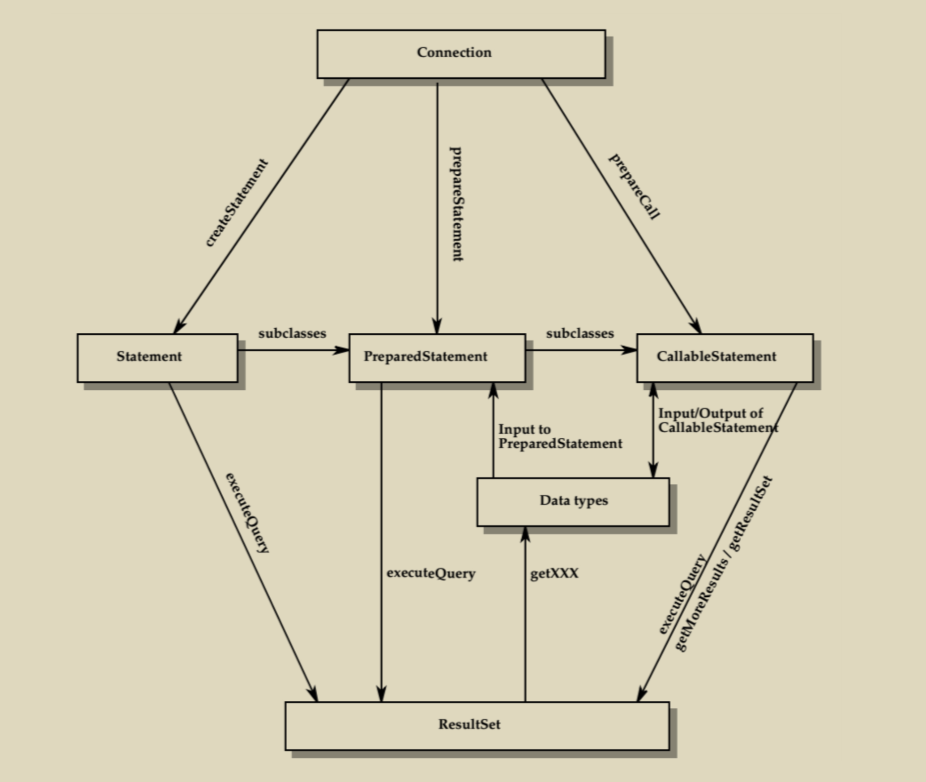
java.sql核心类关系,来自MyBatis 3源码深度解析/江荣波

Wrapper

许多JDBC驱动程序提供超越传统JDBC的扩展,为了符合JDBC API规范,驱动厂商可能会在原始类型的基础上进行包装,Wrapper接口为使用JDBC的应用程序提供访问原始类型的功能,从而使用JDBC驱动中一些非标准的特性

  • unwrap()方法用于返回未经过包装的JDBC驱动原始类型实例,我们可以通过该实例调用JDBC驱动中提供的非标准的方法
  • isWrapperFor()方法用于判断当前实例是否是JDBC驱动中某一类型的包装类型

例如:

1
2
3
4
5
6
7
8

Statement statement = connection.createStatement();
Class clazz = Class.forname("oracle.jdbc.OracleStatement");
if(statement.isWrapperFor(clazz)){
OracleStatement oracleStatement = (OracleStatement)stmt.unwrap(clazz);
// do otherthing
}

javax.sql包

  • DataSource接口
    无需像DriverManager似的硬编码
  • PooledConnection接口
    连接复用
  • XADataSource、XAResource和XAConnection接口
    分布式事务支持
  • RowSet接口
    RowSet就相当于数据库表数据在应用程序内存中的映射

示例

通过JDBC访问MySql

环境声明:

  • mysql数据库地址:10.88.88.2:3306
  • mysql版本(select version()):8.0.26

前期准备

1.新建一个空的maven工程,pom中引入最新的mysql-connector-java

1
2
3
4
5
6
7
<dependency>
<groupId>mysql</groupId>
<artifactId>mysql-connector-java</artifactId>
<version>8.0.26</version>
<!-- scope为runtime,避免编写时与java自带jdbc接口混淆 -->
<scope>runtime</scope>
</dependency>

2.数据库初始化

1
2
3
4
5
6
7
8
9
10
11
12
13
14
15
16
17
18
19
20
21
22
23
24
25
26
27
28
29
30
31
32
33
-- 创建数据库learjdbc:
DROP DATABASE IF EXISTS learnjdbc;
CREATE DATABASE learnjdbc;

-- 创建登录用户learn/口令learnpassword
CREATE USER IF NOT EXISTS learn@'%' IDENTIFIED BY 'learnpassword';
GRANT ALL PRIVILEGES ON learnjdbc.* TO learn@'%' WITH GRANT OPTION;
FLUSH PRIVILEGES;

-- 创建表students:
USE learnjdbc;
CREATE TABLE students (
id BIGINT AUTO_INCREMENT NOT NULL,
name VARCHAR(50) NOT NULL,
gender TINYINT(1) NOT NULL,
grade INT NOT NULL,
score INT NOT NULL,
PRIMARY KEY(id)
) Engine=INNODB DEFAULT CHARSET=UTF8;

-- 插入初始数据:
INSERT INTO students (name, gender, grade, score) VALUES ('小明', 1, 1, 88);
INSERT INTO students (name, gender, grade, score) VALUES ('小红', 1, 1, 95);
INSERT INTO students (name, gender, grade, score) VALUES ('小军', 0, 1, 93);
INSERT INTO students (name, gender, grade, score) VALUES ('小白', 0, 1, 100);
INSERT INTO students (name, gender, grade, score) VALUES ('小牛', 1, 2, 96);
INSERT INTO students (name, gender, grade, score) VALUES ('小兵', 1, 2, 99);
INSERT INTO students (name, gender, grade, score) VALUES ('小强', 0, 2, 86);
INSERT INTO students (name, gender, grade, score) VALUES ('小乔', 0, 2, 79);
INSERT INTO students (name, gender, grade, score) VALUES ('小青', 1, 3, 85);
INSERT INTO students (name, gender, grade, score) VALUES ('小王', 1, 3, 90);
INSERT INTO students (name, gender, grade, score) VALUES ('小林', 0, 3, 91);
INSERT INTO students (name, gender, grade, score) VALUES ('小贝', 0, 3, 77);

3.测试连接

1
2
3
4
5
6
7
8
9
10
11
12
13
String JDBC_URL = "jdbc:mysql://10.88.88.2:3306/learnjdbc?useSSL=false&characterEncoding=utf8&allowPublicKeyRetrieval=true";
String JDBC_USER = "learn";
String JDBC_PASSWORD = "learnpassword";
Connection connection = null;
try {
connection = DriverManager.getConnection(JDBC_URL, JDBC_USER, JDBC_PASSWORD);
} catch (SQLException throwables) {
throwables.printStackTrace();
}finally {
if(null != connection){
connection.close();
}
}

4.问题解决

  • Public Key Retrieval is not allowed

连接后面添加allowPublicKeyRetrieval=true
MySQL 8.0 Public Key Retrieval is not allowed 错误的解决方法

  • Access denied for user ‘learn‘@’172.17.0.1’ (using password: YES)

密码错了,仔细检查java代码中的密码

JDBC查询

1
2
3
4
5
6
7
8
9
10
11
12
13
14
15
16
17
18
19
ResultSet resultSet = null;
try (Connection connection = DriverManager.getConnection(JDBCConstant.JDBC_URL,JDBCConstant.JDBC_USER,JDBCConstant.JDBC_PASSWORD);
PreparedStatement preparedStatement = connection.prepareStatement("SELECT id, grade, name, gender FROM students WHERE gender=?")){
preparedStatement.setObject(1,1);
resultSet = preparedStatement.executeQuery();
while (resultSet.next()){
long id = resultSet.getLong(1); // 注意:索引从1开始
long grade = resultSet.getLong(2);
String name = resultSet.getString(3);
int gender = resultSet.getInt(4);
System.out.println(String.format("id:%s grade:%s name:%s gender:%s",id,grade,name,gender));
}
} catch (SQLException throwables) {
throwables.printStackTrace();
}finally {
if(null != resultSet){
resultSet.close();
}
}

这里使用PreparedStatement,这样它会自动帮我们进行’转义’功能,防止SQL注入

JDBC更新

JDBC插入
  • 插入时附带主键id
1
2
3
4
5
6
7
8
9
10
11
try (Connection conn = DriverManager.getConnection(JDBCConstant.JDBC_URL, JDBCConstant.JDBC_USER, JDBCConstant.JDBC_PASSWORD);
PreparedStatement ps = conn.prepareStatement("INSERT INTO students (id, grade, name, gender, score) VALUES (?,?,?,?,?)")){
int index = 1;
ps.setObject(index++, 999); // 注意:索引从1开始
ps.setObject(index++, 1); // grade
ps.setObject(index++, "Bob"); // name
ps.setObject(index++, 0); // gender
ps.setObject(index++, 100); // score
int n = ps.executeUpdate(); // 1
System.out.println(String.format("flag:%s",n));
}
  • 使用数据库自动生成id
1
2
3
4
5
6
7
8
9
10
11
12
13
14
15
16
17
try (Connection conn = DriverManager.getConnection(JDBCConstant.JDBC_URL, JDBCConstant.JDBC_USER, JDBCConstant.JDBC_PASSWORD);
PreparedStatement ps = conn.prepareStatement("INSERT INTO students (grade, name, gender, score) VALUES (?,?,?,?)", Statement.RETURN_GENERATED_KEYS)){
int index = 1;
ps.setObject(index++, 2); // grade
ps.setObject(index++, "Bob2"); // name
ps.setObject(index++, 0); // gender
ps.setObject(index++, 90); // score
int n = ps.executeUpdate(); // 1
System.out.println(String.format("flag:%s",n));
// 通过`getGeneratedKeys`获取自动生成的id
try (ResultSet resultSet = ps.getGeneratedKeys()) {
if (resultSet.next()){
long id = resultSet.getLong(1);
System.out.println(String.format("id:%s",id));
}
}
}
JDBC更新
1
2
3
4
5
6
7
8
9
10
try (Connection conn = DriverManager.getConnection(JDBCConstant.JDBC_URL, JDBCConstant.JDBC_USER, JDBCConstant.JDBC_PASSWORD);
PreparedStatement ps = conn.prepareStatement("UPDATE students SET name=? WHERE id=?")){
int index = 1;
ps.setObject(index++, "Bob"); // 注意:索引从1开始
ps.setObject(index++, 999);
int n = ps.executeUpdate(); // 返回更新的行数
System.out.println(String.format("更新的行数:%s",n));
} catch (SQLException throwables) {
throwables.printStackTrace();
}
JDBC删除
1
2
3
4
5
6
7
8
9
try (Connection conn = DriverManager.getConnection(JDBCConstant.JDBC_URL, JDBCConstant.JDBC_USER, JDBCConstant.JDBC_PASSWORD);
PreparedStatement ps = conn.prepareStatement("DELETE FROM students WHERE id=?")){
int index = 1;
ps.setObject(index++, 999); // 注意:索引从1开始
int n = ps.executeUpdate(); // 删除的行数
System.out.println(String.format("删除的行数:%s",n));
} catch (SQLException throwables) {
throwables.printStackTrace();
}

JDBC事务

1
2
3
4
5
6
7
8
9
10
11
12
13
14
15
16
17
18
19
20
21
22
23
24
25
26
27
28
29
30
31
32
33
PreparedStatement ps = null;
Connection connection = null;
try {
connection = DriverManager.getConnection(JDBCConstant.JDBC_URL,JDBCConstant.JDBC_USER,JDBCConstant.JDBC_PASSWORD);
boolean autoCommit = connection.getAutoCommit();
System.out.println(String.format("autoCommit:%s",autoCommit));
connection.setAutoCommit(false);
ps = connection.prepareStatement("UPDATE students SET name=? WHERE id=?");
int index = 1;
ps.setObject(index++, "Bob"); // 注意:索引从1开始
ps.setObject(index++, 999);
int n = ps.executeUpdate(); // 返回更新的行数
System.out.println(String.format("更新的行数:%s",n));
ps.close();
ps = connection.prepareStatement("UPDATE students SET name=? WHERE id=?");
index = 1;
ps.setObject(index++, "Bob999"); // 注意:索引从1开始
ps.setObject(index++, 999);
n = ps.executeUpdate(); // 返回更新的行数
System.out.println(String.format("更新的行数:%s",n));
connection.commit();
connection.setAutoCommit(true);
} catch (SQLException throwables) {
connection.rollback();
throwables.printStackTrace();
}finally {
if(null != connection){
connection.close();
}
if(null != ps){
ps.close();
}
}

JDBC Batch

1
2
3
4
5
6
7
8
9
10
11
12
13
14
15
try (PreparedStatement ps = conn.prepareStatement("INSERT INTO students (name, gender, grade, score) VALUES (?, ?, ?, ?)")) {
// 对同一个PreparedStatement反复设置参数并调用addBatch():
for (Student s : students) {
ps.setString(1, s.name);
ps.setBoolean(2, s.gender);
ps.setInt(3, s.grade);
ps.setInt(4, s.score);
ps.addBatch(); // 添加到batch
}
// 执行batch:
int[] ns = ps.executeBatch();
for (int n : ns) {
System.out.println(n + " inserted."); // batch中每个SQL执行的结果数量
}
}

JDBC 连接池

这里使用HikariCP

1
2
3
4
5
<dependency>
<groupId>com.zaxxer</groupId>
<artifactId>HikariCP</artifactId>
<version>4.0.3</version>
</dependency>
1
2
3
4
5
6
7
8
9
10
11
12
13
14
15
16
17
18
19
20
ResultSet resultSet = null;
DataSource dataSource = JDBCConstant.getDataSource();
try (Connection connection = dataSource.getConnection();
PreparedStatement preparedStatement = connection.prepareStatement("SELECT id, grade, name, gender FROM students WHERE gender=?")){
preparedStatement.setObject(1,1);
resultSet = preparedStatement.executeQuery();
while (resultSet.next()){
long id = resultSet.getLong(1); // 注意:索引从1开始
long grade = resultSet.getLong(2);
String name = resultSet.getString(3);
int gender = resultSet.getInt(4);
System.out.println(String.format("id:%s grade:%s name:%s gender:%s",id,grade,name,gender));
}
} catch (SQLException throwables) {
throwables.printStackTrace();
}finally {
if(null != resultSet){
resultSet.close();
}
}

参考

1.JDBC编程
2.MyBatis源码解析大合集
3.MyBatis 3源码深度解析/江荣波