issues/461问题修复

BUG链接:

issues/461

1
2
3
4
5
6
7
8
[fetch & build]: boost
command: ./bootstrap.sh "--with-libraries=filesystem,system,date_time,regex"
./bootstrap.sh: 1: ./bootstrap.sh: ./tools/build/src/engine/build.sh: not found
Building Boost.Build engine with toolset ...
Failed to build Boost.Build build engine
Consult 'bootstrap.log' for more details
Error (./bootstrap.sh): 1
Error (./make.py): 1

BUG说明

就是说在编译的时候报某某文件不存在

解决步骤

1.首先BUG位置

我们根据[fetch & build]知道应该是在编译boost的时候出现了问题,但是这个boost在哪里我们是不知道的,
所以问题就变成了我们要确定boost的文件位置

通过搜索[fetch & build]: boost关键字找到了build_tools/scripts/core_common/modules/boost.py这个文件
可以确定应该就是这个文件在执行的时候出现了问题,为了更加确定,我们添加一点调试信息

1
2
3
4
5
6
7
8
9
if (-1 != config.option("platform").find("linux")) and not base.is_dir("../build/linux_64"):
# 调试信息
base.cmd('pwd')
# 调试信息
base.cmd("./bootstrap.sh", ["--with-libraries=filesystem,system,date_time,regex"])
base.cmd("./b2", ["headers"])
base.cmd("./b2", ["--clean"])
base.cmd("./b2", ["--prefix=./../build/linux_64", "link=static", "cxxflags=-fPIC", "install"])
# TODO: support x86

base.cmd('pwd')是我们添加的调试信息,通过pwd命令确定命令的执行目录
再次运行会发现,出错信息变成了

1
2
3
4
5
6
7
8
9
10
[fetch & build]: boost
command: pwd
(我的目录)/gitrepos/core/Common/3dParty/boost/boost_1_72_0
command: ./bootstrap.sh "--with-libraries=filesystem,system,date_time,regex"
./bootstrap.sh: 1: ./bootstrap.sh: ./tools/build/src/engine/build.sh: not found
Building Boost.Build engine with toolset ...
Failed to build Boost.Build build engine
Consult 'bootstrap.log' for more details
Error (./bootstrap.sh): 1
Error (./make.py): 1

我们切换到(我的目录)/gitrepos/core/Common/3dParty/boost/boost_1_72_0这个目录发现
这个目录下确实存在一个bootstrap.sh的可执行文件,我们打开这个文件,搜索/tools/build/src/engine/build.sh
发现

1
2
3
4
5
my_dir=$(dirname "$0")

# Determine the toolset, if not already decided
if test "x$TOOLSET" = x; then
guessed_toolset=`$my_dir/tools/build/src/engine/build.sh --guess-toolset`

所以说应该是(我的目录)/gitrepos/core/Common/3dParty/boost/boost_1_72_0/tools/build下缺少文件造成的这个错误

2.找到BUG原因

我们仔细看下build_tools/scripts/core_common/modules/boost.py这个文件,可以发现这么一段逻辑

1
2
3
4
5
6
7
8
9
10
11
12
13
14
15
16
17
18
19
print("[fetch & build]: boost")

base_dir = base.get_script_dir() + "/../../core/Common/3dParty/boost"
old_cur = os.getcwd()
os.chdir(base_dir)

# download
#url = "https://downloads.sourceforge.net/project/boost/boost/1.58.0/boost_1_58_0.7z"
#if not base.is_file("boost_1_58_0.7z"):
# base.download("https://downloads.sourceforge.net/project/boost/boost/1.58.0/boost_1_58_0.7z", "boost_1_58_0.7z")
#if not base.is_dir("boost_1_58_0"):
# base.extract("boost_1_58_0.7z", "./")

base.common_check_version("boost", "5", clean)

if not base.is_dir("boost_1_72_0"):
base.cmd("git", ["clone", "--recursive", "--depth=1", "https://github.com/boostorg/boost.git", "boost_1_72_0", "-b" "boost-1.72.0"])

os.chdir("boost_1_72_0")

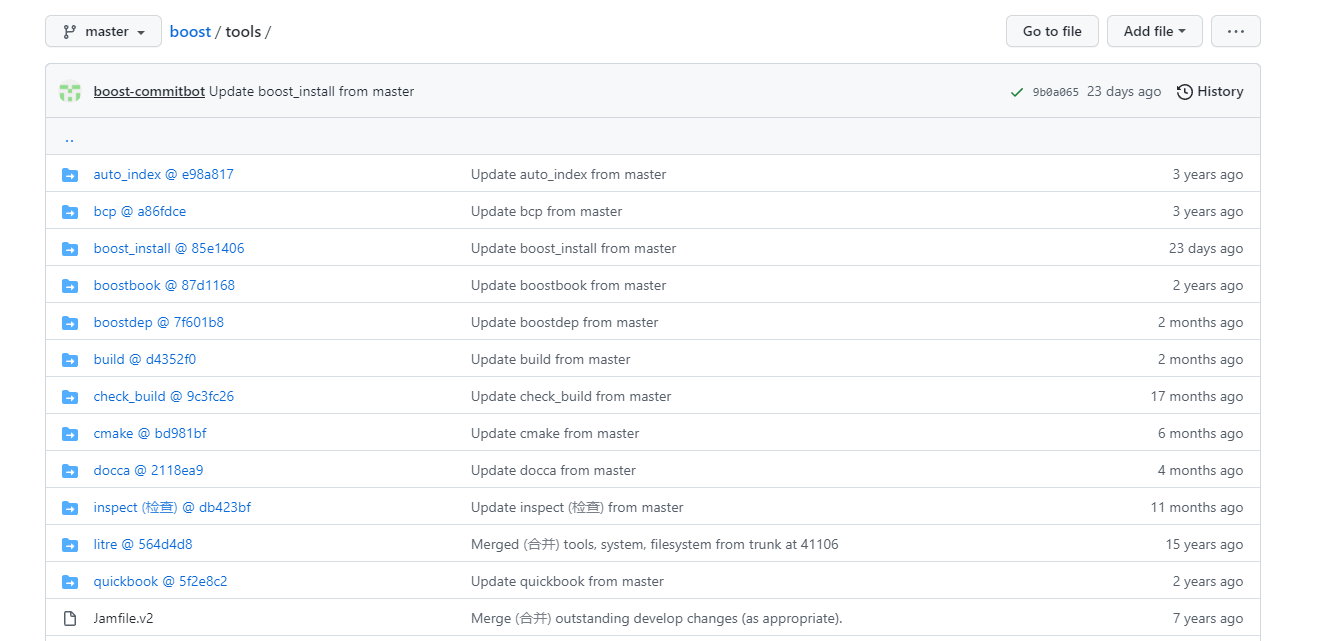
也就是说boost_1_72_0这个文件是通过git clone得来的(之前是通过下载得到的),而访问https://github.com/boostorg/boost.git这个地址会发现

它下面还有子模块
boost.png

所以造成BUG的原因就清楚了:
boost由下载压缩包改为git clone时没有初始化boost本身含有的子模块造成的bug

可是我们要注意git clone时命令

1
git clone --recursive --depth=1 https://github.com/boostorg/boost.git boost_1_72_0 -b boost-1.72.0

--recursive指在clone的时候循环初始化子模块,所以这个命令是考虑到子模块的问题.

那我为什么会出现这个问题呢?

我仔细回忆了初始化的过程,回想起第一次初始化时曾因为GFW问题导致git clone,所以应该就是在初始化boost下的某一个子模块的时候网络出现了问题,导致后面的子模块没有正常初始化

3.修复

删掉(我的目录)/gitrepos/core/Common/3dParty/boost/boost_1_72_0这个目录,重新执行一遍编译

FUCK GFW

Bean条件注入

  • IHandler
    1
    2
    3
    public interface IHandler {
    String handle(String param);
    }
    • AHandlerImpl
      1
      2
      3
      4
      5
      6
      7
      8
      9
      @Slf4j
      @Component
      public class AHandlerImpl implements IHandler {
      @Override
      public String handle(String param) {
      log.info("exec A");
      return "A";
      }
      }
    • BHandlerImpl
      1
      2
      3
      4
      5
      6
      7
      8
      9
      @Slf4j
      @Component
      public class BHandlerImpl implements IHandler {
      @Override
      public String handle(String param) {
      log.info("exec B");
      return "B";
      }
      }

controller使用到IHandler

1
2
@Autowired
private IHandler handler;
  1. Bean重复问题
    此时会报错,因为Spring不知道controller需要的IHandlerAHandlerImplBHandlerImpl中哪一个
    这时候只需要在AHandlerImplBHandlerImpl上随便选择一个加上@Primary注解即可解决报错问题

  2. 在某种条件下实现Bean注入

  • 有了BHandlerImpl就注入BHandlerImpl,否则就注入默认的AHandlerImpl
    AHandlerImpl上添加@ConditionalOnMissingBean注解,例如:
    1
    2
    3
    4
    @Component
    @ConditionalOnMissingBean(IHandler.class) // 只要存在实现IHandler接口的Bean,AHandlerImpl就不会注入进去
    public class AHandlerImpl implements IHandler {
    }

Conditional的解析发生在

CMake学习

CMake

语法介绍

  • 基本语法格式

    • 指令(参数1 参数2)

      • 参数使用括号()(括号)包裹
      • 参数之间使用空格或分号分隔
    • 指令是大小无关的,参数和变量是大小有关的

    • 变量使用${}方式取值,但是在IF控制语句中直接使用变量名

基本指令

include_directories

向工程添加多个特定的头文件搜索路径
相当于-I参数

1
2
3
4
include_directories(
${CMAKE_CURRENT_SOURCE_DIR}/include
${CMAKE_CURRENT_SOURCE_DIR}/../include
)

向工程添加多个特定的库文件搜索路径
相当于-L参数

1
2
3
4
link_directories(
${CMAKE_CURRENT_SOURCE_DIR}/lib
${CMAKE_CURRENT_SOURCE_DIR}/../lib
)

add_library

生成一个库文件

1
2
3
4
add_library(
mytest
${CMAKE_CURRENT_SOURCE_DIR}/mytest.cpp
)

add_compile_options

添加编译选项

1
2
3
4
add_compile_options(
-Wall
-Wextra
)

add_executable

生成一个可执行文件

1
2
3
4
5
# 其中mytest相当于target
add_executable(
mytest
${CMAKE_CURRENT_SOURCE_DIR}/mytest.cpp
)

添加库文件到可执行文件
相当于-l参数

1
2
3
4
target_link_libraries(
mytest
mytestlib
)

add_subdirectory

向工程添加子目录,并可以指定中间二进制和目标二进制的存放路径

1
2
3
4
add_subdirectory(
${CMAKE_CURRENT_SOURCE_DIR}/subdir
${CMAKE_CURRENT_BINARY_DIR}/subdir
)

aux_source_directory

发现指定目录下的所有源文件,并将其添加到一个变量中

1
2
3
4
5
6
7
8
9
10
aux_source_directory(
${CMAKE_CURRENT_SOURCE_DIR}/subdir
${CMAKE_CURRENT_BINARY_DIR}/subdir
SOURCES
)

add_executable(
mytest
${SOURCES}
)

常用变量

CMAKE_C_FLAGS

gcc编译选项

1
set(CMAKE_C_FLAGS "${CMAKE_C_FLAGS} -Wall -Wextra")

CMAKE_CXX_FLAGS

g++编译选项

1
set(CMAKE_CXX_FLAGS "${CMAKE_CXX_FLAGS} -Wall -Wextra")

CMAKE_BUILD_TYPE

编译类型

  • Debug
  • Release
  • RelWithDebInfo
  • MinSizeRel
1
set(CMAKE_BUILD_TYPE Debug)

Spring Boot自动装配

基于SpringBoot 2.3.9.RELEASE 版本

  1. 先扫描得到配置类
  2. org.springframework.boot.autoconfigure.AutoConfigurationImportSelector#selectImports 得到自动配置类
    AutoConfigurationImportSelector实现了DeferredImportSelector接口,DeferredImportSelector就保证一定在配置类全部解析完成后才调用selectImports方法

Spring Boot启动分析

基于SpringBoot 2.3.9.RELEASE 版本

代码示例

使用SpringApplication.run方法启动一个SpringBoot程序

1
2
3
4
5
6
@SpringBootApplication
public class SampleTestApplication {
public static void main(String[] args) {
SpringApplication.run(SampleTestApplication.class, args);
}
}

启动流程

前期

org.springframework.boot.SpringApplication#run(java.lang.Class<?>, java.lang.String...)

1
2
3
public static ConfigurableApplicationContext run(Class<?> primarySource, String... args) {
return run(new Class<?>[] { primarySource }, args);
}

会把传入的SampleTestApplication.class包装成Class<?>数组,最终调用的是
org.springframework.boot.SpringApplication#run(java.lang.Class<?>[], java.lang.String[])

1
2
3
public static ConfigurableApplicationContext run(Class<?>[] primarySources, String[] args) {
return new SpringApplication(primarySources).run(args);
}

所以SpringBoot启动时主类可以有多个

流程

1. 通过new SpringApplication(primarySources)生成一个SpringApplication对象

1.确定web应用类型 NONE,SERVLET,REACTIVE
1
2
// 通过判断相关类是否存在确定应用类型
this.webApplicationType = WebApplicationType.deduceFromClasspath();
2.从META-INF/spring.factories初始化初始化器(获取ApplicationContextInitializer对象)
1
setInitializers((Collection) getSpringFactoriesInstances(ApplicationContextInitializer.class));
3.从META-INF/spring.factories初始化监听器(获取ApplicationListener对象)
事件那一套使用的
1
setListeners((Collection) getSpringFactoriesInstances(ApplicationListener.class));
4. 找到主类(Main方法所在类)
1
2
// 这个方法比较有意思,是通过主动抛出异常的方式找到主类
this.mainApplicationClass = deduceMainApplicationClass();

2. SpringApplication的对象.run()方法执行

1
new SpringApplication(primarySources).run(args)
1.从spring.factories中获取SpringApplicationRunListeners对象,默认会获取一个EventPublishingRunlistener,它会触发启动过程中各个阶段的事件
1
2
// listeners中默认会找到一个EventPublishingRunlistener
SpringApplicationRunListeners listeners = getRunListeners(args);
2.SpringApplicationRunListener.starting()
1
listeners.starting();
3.创建一个Spring容器(也叫上下文,ConfigurableApplicationContext)
1
2
// 根据应用类型创建容器
context = createApplicationContext();
4.上下文准备(prepareContext)
1
2
3
4
5
6
// 方法内:
// 5. 调用ApplicationContextInitializer的initialize方法
// 6. 调用SpringApplicationRunListener的contextPrepared方法
// 7. 把run方法传进来的类注入到容器中
// 8. 调用SpringApplicationRunListener的contextLoaded方法
prepareContext(context, environment, listeners, applicationArguments, printedBanner);
9.刷新上下文(refreshContext)
1
2
// 会解析配置类,扫描,启动WebServer(Tomcat/Jetty/Undertow)(AutoConfigurationImportSelector,DeferredImportSelector)'
refreshContext(context)
9.调用ApplicationRunner和CommandLineRunner(callRunner)
1
callRunners(context, applicationArguments)

1##### 0.SpringApplicationRunListener.running()

1
listeners.running(context)

Spring Boot源码阅读环境搭建

基于SpringBoot 2.3.9.RELEASE 版本

前期准备

如果希望搭建SpringBoot源码阅读环境,必须科学上网,不要相信使用国内源下载依赖,阿里的源会有问题

流程

  1. 克隆代码,切换到2.3.9.release分支,导入IDE

  2. 这里如果下载依赖正常,通常还是会报错的,需要注释掉源码中的两处

  • settings.gradle中注释掉’io.spring.ge.conventions’

    1
    2
    3
    4
    plugins {
    id "com.gradle.enterprise" version "3.5.2"
    // id "io.spring.ge.conventions" version "0.0.7"
    }
  • buildSrcbuild.gradle中注释掉io.spring.javaformat

    1
    2
    3
    4
    5
    plugins {
    id "java-gradle-plugin"
    //id "io.spring.javaformat" version "${javaFormatVersion}"
    id "checkstyle"
    }

补充说明

一般下载完依赖,注释掉格式化等插件就可以直接在IDE中运行spring-boot-tests下的测试用例了
但我选择在源码根目录下新建spring-boot-test模块然后新建一个正常的SpringBoot程序,只不过引用的是源码中的依赖
我使用的版本是v2.3.9.release版,使用gradle做依赖管理,下面是build.gradle示例

1
2
3
4
5
6
7
8
9
10
11
12
plugins {
id 'java'
id "org.springframework.boot.conventions"
}

description = "Spring Boot Test test"

dependencies {
implementation(project(":spring-boot-project:spring-boot-starters:spring-boot-starter-web"))

testImplementation(project(":spring-boot-project:spring-boot-starters:spring-boot-starter-test"))
}

解决DBApi gateway 中文乱码问题

问题链接

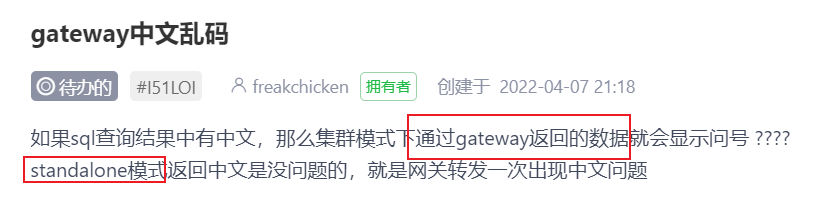
gateway中文乱码

dbapi的gateway中文乱码问题

排查思路

初步分析

dbapi支持两种部署模式,一种是单机版(standalone模式),一种是集群版(gatewayapiserver版本).两种模式同一请求返回结果不一致,
那么一定是两种模式下存在某些差异导致中文乱码

环境搭建

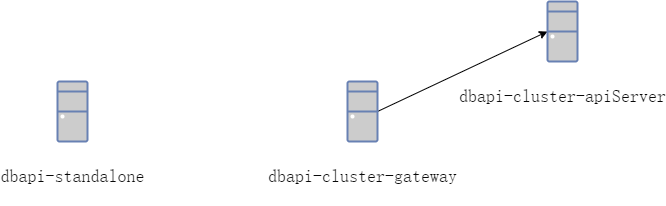
dbapi调用服务拓扑图

需要启动dbapi-standalone,dbapi-cluster-gateway,dbapi-cluster-apiServer
其中dbapi-cluster-gateway,dbapi-cluster-apiServer需要通过nacos暴露服务

复现

在复现的时候,我发现的确如果返回值中存在中文,单机版返回正常,访问gateway返回的中文乱码。
因为gateway最终也是调用的apiserver,所以我们直接调用apiserver,发现apiserver返回的中文乱码
至此我们怀疑是apiserver造成中文乱码问题
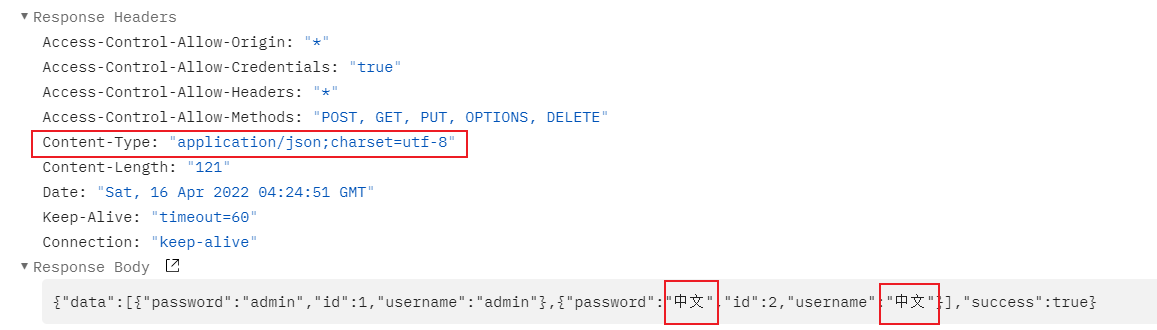
同时注意到单机版返回的responsecontent-type正常,apiserver返回的response没有content-type

单机版返回response示例:

单机返回response

apiserver返回response示例:

apiserver返回response

因此我们怀疑是apiserver没有为response设置content-type造成中文乱码

代码分析

使用代码版本: dev分支:409a6cf2c0ec222946754d195846bb7023ca0c3b

使用关键字.setContentType(搜索,代码中为返回值设置response的地方共有6处,其中我们需要关心以下两个地方:

  • com.gitee.freakchicken.dbapi.basic.conf.JwtAuthenticationInterceptor
  • com.gitee.freakchicken.dbapi.basic.filter.ApiIPFilter

通过com.gitee.freakchicken.dbapi.basic.conf.MyConfig#addInterceptors发现JwtAuthenticationInterceptor主要校验前端UI,因此请求进来的时候起作用只能是ApiIPFilter
要么是请求打到apiserver,请求调用的时候没有经历这个ApiIPFilter,要么就是请求通过这个ApiIPFilter设置的response content-type没有效果

通过测试,发现当直接请求apiserver时并没有通过ApiIPFilter,通过分析apiserver代码,在com.gitee.freakchicken.dbapi.apiserver.DBApiApiServerComponentScan中排除了com.gitee.freakchicken.dbapi.basic.filter.ApiIPFilter

同时我们发现gateway存在com.gitee.freakchicken.dbapi.gateway.filter.GatewayIPFilter,应该是作者认为gateway存在了ip过滤,apiserver就不应该再过滤一遍ip,但是却忽略了response设置编码这一环

修复

添加一个统一的请求头过滤器com.gitee.freakchicken.dbapi.basic.filter.ApiHeaderFilter只针对dbapi.api.context配置的地址,同时调整注册filter与sevlet的代码结构

分别为:

  • com.gitee.freakchicken.dbapi.conf.FilterConfig
    ipFilter order设置为1,authFilter order设置为2,apiHeaderFilter order设置为3(这里有坑,下面有解释)
  • com.gitee.freakchicken.dbapi.conf.ServletConfig
  • com.gitee.freakchicken.dbapi.apiserver.conf.FilterConfig
    authFilter order设置为2,apiHeaderFilter order设置为3(这里有坑,下面有解释)
  • com.gitee.freakchicken.dbapi.apiserver.conf.ServletConfig

调试

  1. 发现单机模式下返回值正常,集群模式下返回值有content-type,但是content-type却不是我们设置的utf-8

集群模式下response
第一次修复response

  1. 我将com.gitee.freakchicken.dbapi.basic.filter.ApiHeaderFilter#doFilter的代码改为
    1
    2
    3
    4
    5
    6
    7
    8
    9
    10
    11
    String characterEncoding = response.getCharacterEncoding();
    System.out.println("设置CharacterEncoding前: "+characterEncoding);
    response.setCharacterEncoding("UTF-8");
    characterEncoding = response.getCharacterEncoding();
    System.out.println("设置CharacterEncoding后: "+characterEncoding);

    String contentType = response.getContentType();
    System.out.println("设置ContentType前: "+contentType);
    response.setContentType("application/json; charset=utf-8");
    contentType = response.getContentType();
    System.out.println("设置ContentType后: "+contentType);
    用以调试

发现response.setContentTyperesponse.setCharacterEncoding不起作用

当请求单机版时发现输出为

1
2
3
4
设置CharacterEncoding前: utf-8
设置CharacterEncoding后: utf-8
设置ContentType前: application/json;charset=utf-8
设置ContentType后: application/json;charset=utf-8

当请求apiserver时发现输出为

1
2
3
4
设置CharacterEncoding前: ISO-8859-1
设置CharacterEncoding后: ISO-8859-1
设置ContentType前: null
设置ContentType后: application/json;charset=ISO-8859-1

下面就response.setContentTyperesponse.setCharacterEncoding问题分为单机版与集群版两种模式下讨论
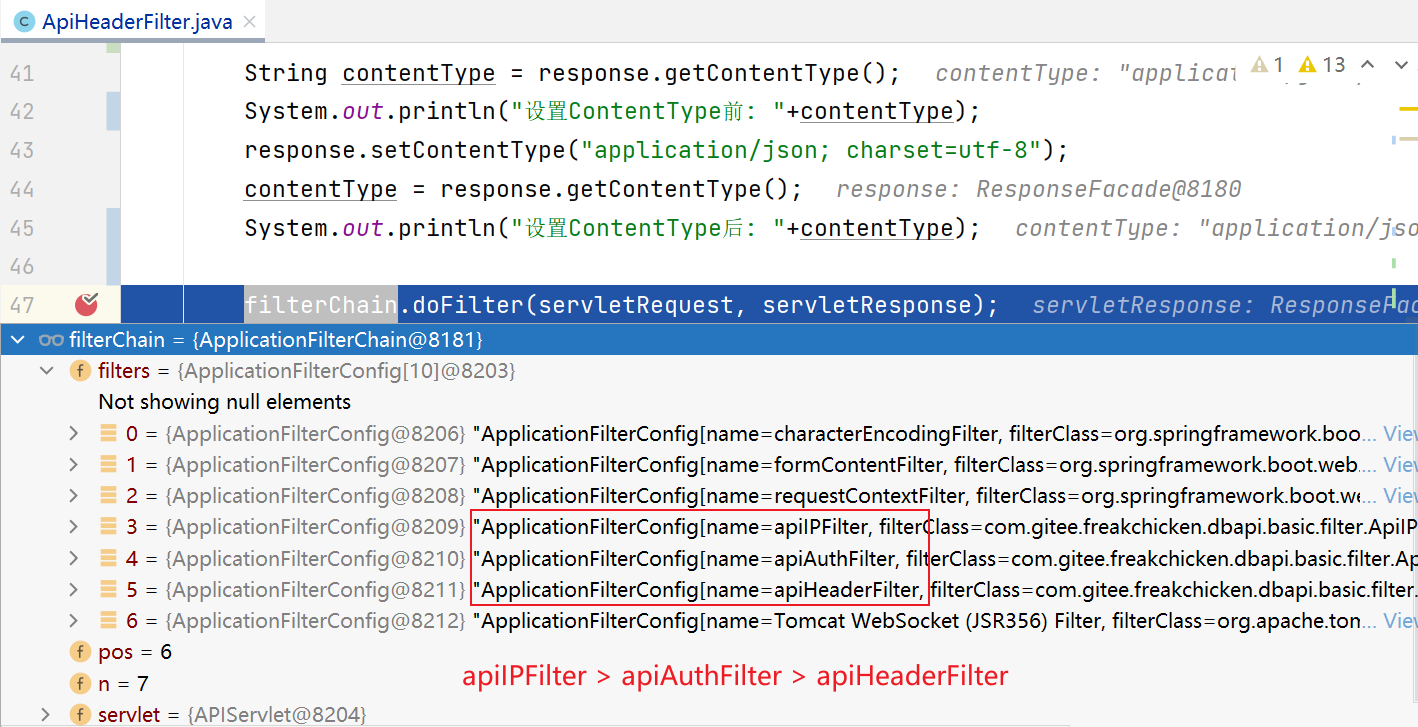
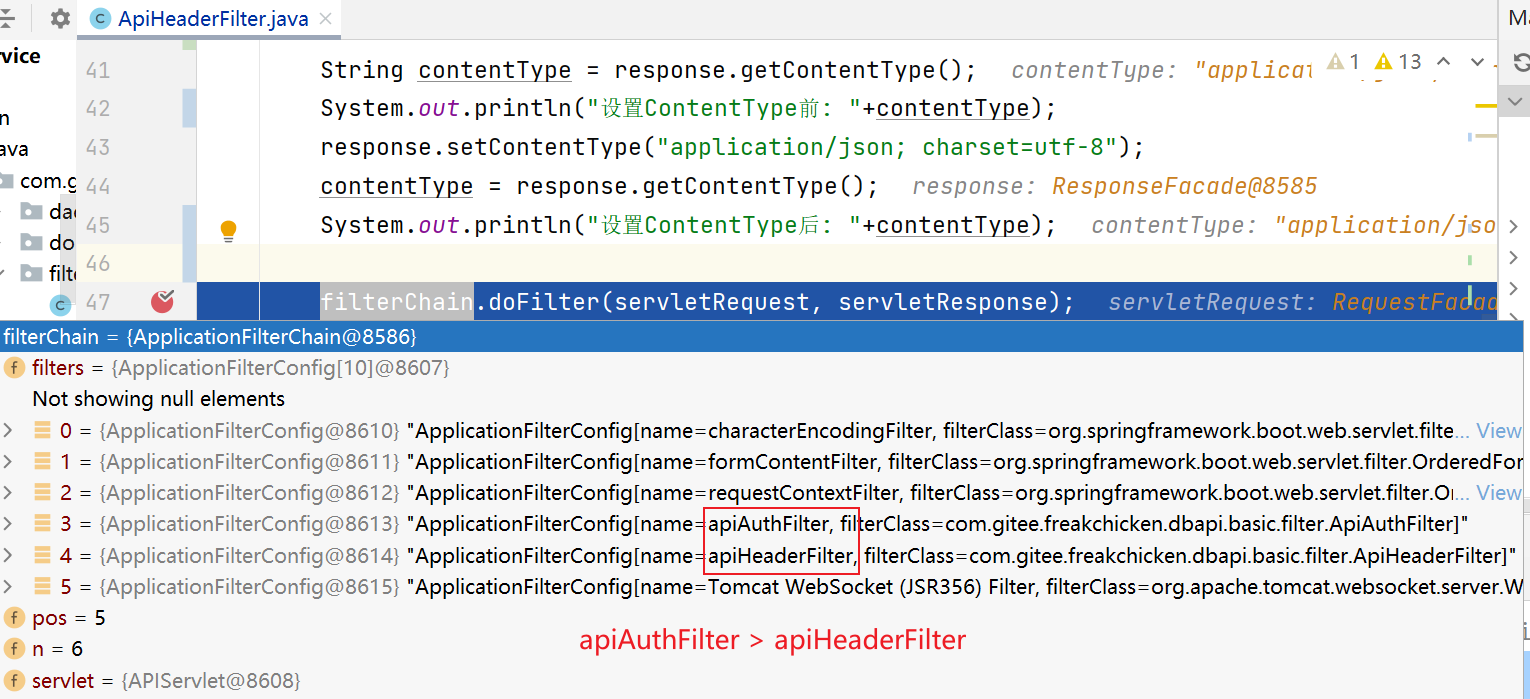
首先我们要注意,dbapi在两种模式下的FilterChain是不同的

  1. 单机版FilterChain

单机版FilterChain

当请求单机版时,apiIPFilterapiHeaderFilter之前,因此此时apiHeaderFilter设不设置无所谓

  1. 集群版FilterChain

集群版FilterChain

当请求集群版时,apiAuthFilterapiHeaderFilter之前,此时apiHeaderFilter再设置就不起作用了

通过断点调试,发现在apiAuthFilterresponse.getWriter()时会setCharacterEncoding,而这个set的值就是ISO-8859-1,同时org.apache.catalina.connector.Response在设置完编码后会将usingWriter设为true导致下次设置就不会起作用

这告诉我们不使用writer的时候不要提前获取response的writer,否则无法在后续filter中设置编码,同时设置response的编码最好放在第一个

按照这个原则,我们再次修改代码,调试提交
类加载器的并行加载模式registerAsParallelCapable源码分析

并行加载模式

1
2
3
4
5
6
7
static {
/*
* Try to solve the classloader dead lock. See https://github.com/apache/skywalking/pull/2016
* 为了解决ClassLoader死锁问题,开启类加载器的并行加载模式
*/
registerAsParallelCapable();
}
  • 在JDK 1.7之前,类加载器在加载类的时候是串行加载的,比如有100个类需要加载,那么就排队,加载完上一个再加载下一个,这样加载效率就很低, ClassLoader加载类的时候加锁的时候是用自身作为锁的,容易产生死锁

  • 在JDK 1.7之后,就提供了类加载器并行能力,就是把锁的粒度变小,现在是每一个类都有一个独立的锁

ClassLoader的registerAsParallelCapable()方法源码

1
2
3
4
5
6
7
8
9
10
11
12
13
14
15
16
17
18
19
20
21
22
23
24
25
26
27
28
29
30
31
32
33
34
35
36
37
38
39
40
41
42
43
44
45
46
47
public abstract class ClassLoader { 
/**
* 将调用该方法的类加载器注册为具备并行能力的
* 同时满足以下两个条件时,注册才会成功
* 1.调用该方法的类加载器实例还未创建
* 2.调用该方法的类加载器所有父类(Object类除外)都注册为具备并行能力的
*/
@CallerSensitive
protected static boolean registerAsParallelCapable() {
// 把调用该方法的Class对象转换为ClassLoader的子类
Class callerClass = Reflection.getCallerClass().asSubclass(ClassLoader.class);
// 注册为具备并行能力的
return ParallelLoaders.register(callerClass);
}

private static class ParallelLoaders {
private ParallelLoaders() {}
// loaderTypes中保存了所有具备并行能力的类加载器
// 注意这里是WeakHashMap 可参考https://blog.csdn.net/kaka0509/article/details/73459419
private static final Set> loaderTypes = Collections.newSetFromMap(new WeakHashMap<>());
static {
// ClassLoader本身就是支持并行加载的
synchronized (loaderTypes) {
loaderTypes.add(ClassLoader.class);
}
}
static boolean register(Class c) {
synchronized (loaderTypes) {
// 当且仅当该类加载器的所有父类都具备并行能力时,该类加载器才能被注册成功
if (loaderTypes.contains(c.getSuperclass())) {
loaderTypes.add(c);
return true;
} else {
return false;
}
}
}
/**
* 判定给定的类加载器是否具备并行能力
*/
static boolean isRegistered(Class c) {
synchronized (loaderTypes) {
return loaderTypes.contains(c);
}
}
}
}

并行加载的实现

1
2
3
4
5
6
7
8
9
10
11
12
13
14
15
16
17
18
19
20
21
22
23
24
25
26
27
28
29
30
31
32
33
34
35
36
37
38
39
40
41
42
43
44
45
46
47
48
49
50
51
52
53
54
55
56
57
58
59
60
61
62
63
64
65
66
67
68
69
70
71
72
73
74
75
76
77
78
79
public abstract class ClassLoader {

private final ConcurrentHashMap<String, Object> parallelLockMap;

private ClassLoader(Void unused, String name, ClassLoader parent) {
this.name = name;
this.parent = parent;
this.unnamedModule = new Module(this);
// 判断当前类加载器是否具备并行能力,如果具备则对parallelLockMap进行初始化
if (ParallelLoaders.isRegistered(this.getClass())) {
parallelLockMap = new ConcurrentHashMap<>();
package2certs = new ConcurrentHashMap<>();
assertionLock = new Object();
} else {
// no finer-grained lock; lock on the classloader instance
parallelLockMap = null;
package2certs = new Hashtable<>();
assertionLock = this;
}
this.nameAndId = nameAndId(this);
}

protected Class<?> loadClass(String name, boolean resolve)
throws ClassNotFoundException
{
// 加锁,调用getClassLoadingLock方法获取类加载时的锁
synchronized (getClassLoadingLock(name)) {
// First, check if the class has already been loaded
Class<?> c = findLoadedClass(name);
if (c == null) {
long t0 = System.nanoTime();
try {
if (parent != null) {
c = parent.loadClass(name, false);
} else {
c = findBootstrapClassOrNull(name);
}
} catch (ClassNotFoundException e) {
// ClassNotFoundException thrown if class not found
// from the non-null parent class loader
}

if (c == null) {
// If still not found, then invoke findClass in order
// to find the class.
long t1 = System.nanoTime();
c = findClass(name);

// this is the defining class loader; record the stats
PerfCounter.getParentDelegationTime().addTime(t1 - t0);
PerfCounter.getFindClassTime().addElapsedTimeFrom(t1);
PerfCounter.getFindClasses().increment();
}
}
if (resolve) {
resolveClass(c);
}
return c;
}
}
// 支持并行加载的关键
// 并行加载的原理:
// 如果当前类加载器是支持并行加载的,就把加载类时锁的粒度降低到加载的具体的某一个类上,而不是锁掉整个类加载器
protected Object getClassLoadingLock(String className) {
// 默认(非并行)锁是自身
Object lock = this;
if (parallelLockMap != null) {
// 并行,所就是每一个class一个对象
Object newLock = new Object();
// k:要加载的类名 v:新的锁
lock = parallelLockMap.putIfAbsent(className, newLock);
// 如果是第一次put,则返回newLock
if (lock == null) {
lock = newLock;
}
}
return lock;
}
}

参考

  1. SkyWalking8.7源码解析(一):Agent启动流程、Agent配置加载流程、自定义类加载器AgentClassLoader、插件定义体系、插件加载

maven插件介绍

maven-compiler-plugin

1
2
3
<!-- https://maven.apache.org/plugins/maven-compiler-plugin/ -->
<groupId>org.apache.maven.plugins</groupId>
<artifactId>maven-compiler-plugin</artifactId>

功能

编译jar包

示例

1
2
3
4
5
6
7
8
9
<plugin>
<groupId>org.apache.maven.plugins</groupId>
<artifactId>maven-compiler-plugin</artifactId>
<configuration>
<source>1.8</source>
<target>1.8</target>
<encoding>utf-8</encoding>
</configuration>
</plugin>

maven-clean-plugin

1
2
<groupId>org.apache.maven.plugins</groupId>
<artifactId>maven-clean-plugin</artifactId>

功能

执行命令mvn clean时调用的就是这个插件

示例

1
2
3
4
5
6
7
8
9
10
11
12
13
14
15
16
17
18
<plugin>
<groupId>org.apache.maven.plugins</groupId>
<artifactId>maven-clean-plugin</artifactId>
<version>3.1.0</version>
<configuration>
<!-- 即使清理出错构建仍将继续 -->
<failOnError>true</failOnError>
<filesets>
<fileset>
<!-- 将被删除的文件路径,因为默认是target,所以这里需要配置 -->
<directory>${basedir}/dist</directory>
<includes>
<include>**/*</include>
</includes>
</fileset>
</filesets>
</configuration>
</plugin>

versions-maven-plugin

1
2
3
<!-- https://www.mojohaus.org/versions-maven-plugin/ -->
<groupId>org.codehaus.mojo</groupId>
<artifactId>versions-maven-plugin</artifactId>

功能

批量修改版本号

示例

1
2
3
4
5
6
7
8
<plugin>
<groupId>org.codehaus.mojo</groupId>
<artifactId>versions-maven-plugin</artifactId>
<version>2.7</version>
<configuration>
<generateBackupPoms>false</generateBackupPoms>
</configuration>
</plugin>

maven-source-plugin

1
2
3
<!-- https://maven.apache.org/plugins/maven-source-plugin/ -->
<groupId>org.apache.maven.plugins</groupId>
<artifactId>maven-source-plugin</artifactId>

功能

可以在配置的Maven生命周期中为当前工程创建源码jar包

示例

1
2
3
4
5
6
7
8
9
10
11
12
13
14
15
<plugin>
<groupId>org.apache.maven.plugins</groupId>
<artifactId>maven-source-plugin</artifactId>
<version>2.2.1</version>
<executions>
<execution>
<!-- 该execution的目的是在mvn打包时生成一个含有源代码的jar包 -->
<id>attach-sources</id>
<!-- 默认绑定的生命周期阶段是package -->
<goals>
<goal>jar-no-fork</goal>
</goals>
</execution>
</executions>
</plugin>

maven-jar-plugin

1
2
3
<!-- https://maven.apache.org/plugins/maven-jar-plugin/ -->
<groupId>org.apache.maven.plugins</groupId>
<artifactId>maven-jar-plugin</artifactId>

功能

创建jar包

示例

1
2
3
4
5
6
7
8
9
10
11
12
13
14
15
16
17
18
19
20
<plugin>
<groupId>org.apache.maven.plugins</groupId>
<artifactId>maven-jar-plugin</artifactId>
<configuration>
<excludes><!--不把配置文件打的jar包里面-->
<exclude>**/*.xml</exclude>
<exclude>**/*.properties</exclude>
<exclude>**/*.db</exclude>
</excludes>
</configuration>
<executions>
<execution>
<id>default-jar</id>
<phase>package</phase>
<goals>
<goal>jar</goal>
</goals>
</execution>
</executions>
</plugin>

参考

  1. Maven maven-jar-plugin

maven-antrun-plugin

1
2
3
<!-- https://maven.apache.org/plugins/maven-antrun-plugin/ -->
<groupId>org.apache.maven.plugins</groupId>
<artifactId>maven-antrun-plugin</artifactId>

功能

运行ant命令,文件拷贝与删除

示例

1
2
3
4
5
6
7
8
9
10
11
12
13
14
15
16
17
18
19
20
21
22
23
24
25
26
27
28
29
30
31
<plugin>
<groupId>org.apache.maven.plugins</groupId>
<artifactId>maven-antrun-plugin</artifactId>
<version>3.0.0</version>
<executions>
<execution>
<id>move-dist-to-static</id>
<phase>validate</phase>
<goals>
<goal>run</goal>
</goals>
<configuration>
<!-- 删除static文件夹内容-->
<target>
<delete>
<fileset dir="${basedir}/src/main/resources/static/"
includes="**/*.*"/>
</delete>
</target>
<!-- 复制dist文件夹到static文件夹-->
<target>
<copy todir="${basedir}/src/main/resources/static">
<fileset dir="${basedir}/../dbapi-ui/dist">
<include name="**/*.*"/>
</fileset>
</copy>
</target>
</configuration>
</execution>
</executions>
</plugin>

参考

  1. Maven 插件之 maven-antrun-plugin

exec-maven-plugin

1
2
3
<!-- https://www.mojohaus.org/exec-maven-plugin/ -->
<groupId>org.codehaus.mojo</groupId>
<artifactId>exec-maven-plugin</artifactId>

功能

执行java或命令行命令

示例

1
2
3
4
5
6
7
8
9
10
11
12
13
14
15
16
17
18
19
20
21
22
23
24
25
26
27
28
29
30
31
32
33
34
35
36
<plugin>
<groupId>org.codehaus.mojo</groupId>
<artifactId>exec-maven-plugin</artifactId>
<version>3.0.0</version>
<executions>
<execution>
<id>exec-npm-install</id>
<phase>validate</phase>
<goals>
<goal>exec</goal>
</goals>
<configuration>
<executable>npm</executable>
<arguments>
<argument>install</argument>
</arguments>
<workingDirectory>${basedir}</workingDirectory>
</configuration>
</execution>
<execution>
<id>exec-npm-run-build</id>
<phase>validate</phase>
<goals>
<goal>exec</goal>
</goals>
<configuration>
<executable>npm</executable>
<arguments>
<argument>run</argument>
<argument>build</argument>
</arguments>
<workingDirectory>${basedir}</workingDirectory>
</configuration>
</execution>
</executions>
</plugin>

参考

  1. Exec Maven Plugin全面解析和使用示例
  2. exec-maven-plugin配置及使用

maven-gpg-plugin

1
2
3
<!-- https://maven.apache.org/plugins/maven-gpg-plugin/ -->
<groupId>org.apache.maven.plugins</groupId>
<artifactId>maven-gpg-plugin</artifactId>

功能

使用GnuPG对项目的所有附加构件进行签名(发布时使用)

示例

1
2
3
4
5
6
7
8
9
10
11
12
13
14
<plugin>
<groupId>org.apache.maven.plugins</groupId>
<artifactId>maven-gpg-plugin</artifactId>
<version>1.0</version>
<executions>
<execution>
<id>sign-artifacts</id>
<phase>verify</phase>
<goals>
<goal>sign</goal>
</goals>
</execution>
</executions>
</plugin>

maven-assembly-plugin

1
2
3
<!-- https://maven.apache.org/plugins/maven-assembly-plugin/ -->
<groupId>org.apache.maven.plugins</groupId>
<artifactId>maven-assembly-plugin</artifactId>

功能

编译jar包

示例

1
2
3
4
5
6
7
8
9
10
11
12
13
14
15
16
17
18
19
<plugin>
<artifactId>maven-assembly-plugin</artifactId>
<configuration>
<descriptors>
<!--对应着打包配置-->
<descriptor>binary.xml</descriptor>
</descriptors>
<outputDirectory>${project.parent.basedir}/dist</outputDirectory>
</configuration>
<executions>
<execution>
<id>make-assembly</id>
<phase>package</phase>
<goals>
<goal>single</goal>
</goals>
</execution>
</executions>
</plugin>

binary.xml配置详见Using Component Descriptors中介绍,
示例详见

参考

1.Maven教程(20)— 使用 maven-assembly-plugin插件来定制化打包

从开源项目看Maven配置(01) -- dbapi

背景

本文将介绍开源项目DBApi的Maven配置,通过学习它的配置进而学习Maven知识

项目介绍

这里并没有使用原仓库进行分析,而是使用了其他人fork的分支,该分支修复了一些jar包冲突https://gitee.com/kensan/db-api/tree/feature%2Ffix_version_conflicts

简介

DBApi提供零代码开发api服务,只需编写sql,就可以生成http api服务。支持api动态创建,多数据源连接,动态添加数据源,兼容多种数据库。 适用于BI报表、数据可视化大屏的后端接口快速开发

pom结构

  • dbapi
  • dbapi-ui
  • dbapi-common
  • dbapi-plugin
  • dbapi-service
  • dbapi-controller
  • dbapi-standalone
  • dbapi-cluster-apiServer
  • dbapi-cluster-manager
  • dbapi-cluster-gateway
  • dbapi-assembly

各模块pom配置

dbapi根pom

properties

  1. 根pom中使用properties声明了一些jar包的版本,搭配dependencyManagement便可以控制其子模块中引用的jar包版本

  2. properties中版本的定义使用的是groupId+artifactId,这样就可以避免属性被覆盖的问题,详情可以查看Maven properties覆盖

profiles

  1. 使用profiles定义了两种模式,每种模式引入的子模块module不同,这样仅需切换profile就能满足不同场景下打包的需求

  2. 参考文章:Maven - Profile

dependencyManagement

  1. 多模块管理时控制jar包版本,解决jar包冲突

  2. 配合properties可以方便的调整jar包版本

  3. 参考文章Maven中dependencyManagement作用说明

build

plugins

使用的插件maven-compiler-plugin,maven-clean-plugin,versions-maven-plugin,maven-source-plugin,maven-gpg-plugin详见maven插件介绍中对应插件的介绍

developers

开发者信息

1
2
3
4
5
6
7
8
<!-- https://maven.apache.org/pom.html#Developers -->
<developers>
<developer>
<name>freakchicken</name>
<email>jiangqiang110@126.com</email>
<url>https://gitee.com/freakchicken/db-api</url>
</developer>
</developers>

scm

软件管理方面

1
2
3
4
5
6
<!-- https://maven.apache.org/pom.html#Developers -->
<scm>
<url>https://gitee.com/freakchicken/db-api.git</url>
<connection>scm:git:https://gitee.com/freakchicken/db-api.git</connection>
<developerConnection>scm:git:https://gitee.com/freakchicken/db-api.git</developerConnection>
</scm>

licenses

版权信息

1
2
3
4
5
6
7
8
<!-- https://maven.apache.org/pom.html#Licenses -->
<licenses>
<license>
<name>The Apache Software License, Version 2.0</name>
<url>http://www.apache.org/licenses/LICENSE-2.0.txt</url>
<distribution>repo</distribution>
</license>
</licenses>

distributionManagement

分发

1
2
3
4
5
6
7
8
9
10
<distributionManagement>
<snapshotRepository>
<id>ossrh</id>
<url>https://s01.oss.sonatype.org/content/repositories/snapshots</url>
</snapshotRepository>
<repository>
<id>ossrh</id>
<url>https://s01.oss.sonatype.org/service/local/staging/deploy/maven2/</url>
</repository>
</distributionManagement>

以下将着重介绍各子模块对maven插件的使用

dbapi-assembly

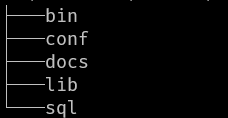
这里有必要介绍下dbapi打包后的产物的目录结构,运行mvn package后,会在项目根目录生成一个dist文件夹。dist文件夹中会包含一个tar.gz文件,解压该文件可得到一个以下结构的文件夹

dist文件结构

其中
/bin/中为shell脚本,对应dbapi-assembly下的bin目录
/conf/中为配置文件
/docs/中为文档,对应dbapi-assembly下的docs目录
/lib/中为使用的jar包
/sql/中为初始脚本,对应dbapi-assembly下的sql目录

这里重点介绍maven-assembly-plugin插件(maven插件介绍)中binary.xml文件

UsingComponentDescriptors

1
2
3
4
5
6
7
8
9
10
11
12
13
14
15
16
17
18
19
20
21
22
23
24
25
26
27
28
29
30
31
32
33
34
35
36
37
38
39
40
41
42
43
44
45
46
47
48
49
50
51
52
53
54
55
56
57
58
59
60
61
62
63
64
65
66
67
68
69
70
71
72
73
74
75
76
77
78
79
80
81
82
83
84
85
86
87
88
89
90
91
92
93
94
95
96
97
98
99
100
101
102
103
104
105
106
107
108
109
110
111
112
113
114
115
116
117
118
119
120
121
122
123
124
125
126
127
128
129
130
131
132
133
134
135
136
137
138
139
140
141
142
143
144
145
146
147
148
149
150
151
152
153
154
155
156
157
<assembly xmlns="http://maven.apache.org/plugins/maven-assembly-plugin/assembly/1.1.0"
xmlns:xsi="http://www.w3.org/2001/XMLSchema-instance"
xsi:schemaLocation="http://maven.apache.org/plugins/maven-assembly-plugin/assembly/1.1.0 http://maven.apache.org/xsd/assembly-1.1.0.xsd">
<!-- 指定 id 的话,目标文件则是 {artifactId}-{id}.{format} -->
<id>bin</id>
<formats>
<format>tar.gz</format>
</formats>
<includeBaseDirectory>true</includeBaseDirectory>
<baseDirectory>DBApi-${project.version}</baseDirectory>
<!-- 用来定制工程依赖 jar 包的打包方式 -->
<dependencySets>
<dependencySet>
<useProjectArtifact>true</useProjectArtifact>
<outputDirectory>lib</outputDirectory>
<excludes>
<!-- 排除assembly自身打的jar包-->
<exclude>com.gitee.freakchicken.dbapi:dbapi-assembly</exclude>
</excludes>
<!-- <unpack>false</unpack>-->
</dependencySet>
</dependencySets>
<fileSets>
<fileSet>
<!-- 把`dbapi-assembly`模块下`bin`目录的所有以`.sh`结尾的文件输出到压缩包的`bin`目录下 -->
<directory>${project.basedir}/bin</directory>
<outputDirectory>bin</outputDirectory>
<lineEnding>unix</lineEnding>
<!-- 指定文件属性,使用八进制表达,分别为(User)(Group)(Other)所属属性,默认为 0644 -->
<fileMode>744</fileMode>
<includes>
<include>*.sh</include>
</includes>
</fileSet>
<fileSet>
<!-- 把`dbapi-assembly`模块下`bin`目录的`install_config.conf`文件输出到压缩包的`conf`目录下 -->
<directory>${project.basedir}/bin</directory>
<outputDirectory>conf</outputDirectory>
<lineEnding>unix</lineEnding>
<fileMode>744</fileMode>
<includes>
<include>install_config.conf</include>
</includes>
</fileSet>
<fileSet>
<!-- 把`dbapi-assembly`模块下`bin`目录的所有以`.bat`结尾的文件输出到压缩包的`bin`目录下 -->
<directory>${project.basedir}/bin</directory>
<outputDirectory>bin</outputDirectory>
<!-- <lineEnding>windows</lineEnding>-->
<includes>
<include>*.bat</include>
</includes>
</fileSet>
<fileSet>
<!-- 把`dbapi-assembly`模块下`docs`目录的所有以`.md`结尾的文件输出到压缩包的`docs`目录下 -->
<directory>${project.basedir}/docs</directory>
<outputDirectory>docs</outputDirectory>
<includes>
<include>*.md</include>
</includes>
</fileSet>
<fileSet>
<!-- 把dbapi根目录下的所有以`.md`结尾的文件输出到压缩包的`docs`目录下 -->
<directory>${project.basedir}/../</directory>
<outputDirectory>docs</outputDirectory>
<includes>
<include>*.md</include>
</includes>
</fileSet>
<fileSet>
<!-- 把`dbapi-assembly`模块下`sql`目录的所有以`.sql`结尾的文件输出到压缩包的`sql`目录下 -->
<directory>${project.basedir}/sql</directory>
<outputDirectory>sql</outputDirectory>
<lineEnding>unix</lineEnding>
<fileMode>644</fileMode>
<includes>
<include>*.sql</include>
</includes>
</fileSet>
<!-- 以下就是把各个模块下的resources下的配置文件输出到压缩包conf目录下-->
<fileSet>
<directory>${project.parent.basedir}/dbapi-standalone/src/main/resources</directory>
<outputDirectory>conf</outputDirectory>
<!-- 不要设置文件编码格式之类的,否则sqlite数据库文件会损坏-->
<!-- <lineEnding>unix</lineEnding>-->
<!-- <fileMode>644</fileMode>-->
<includes>
<include>*.properties</include>
<include>*.xml</include>
<include>*.db</include>
<include>*.yml</include>
</includes>
</fileSet>
<fileSet>
<directory>${project.parent.basedir}/dbapi-service/src/main/resources</directory>
<outputDirectory>conf</outputDirectory>
<includes>
<include>*.properties</include>
<include>*.xml</include>
<include>*.db</include>
<include>*.yml</include>
</includes>
</fileSet>
<fileSet>
<directory>${project.parent.basedir}/dbapi-cluster-gateway/src/main/resources</directory>
<outputDirectory>conf</outputDirectory>
<includes>
<include>*.properties</include>
<include>*.xml</include>
<include>*.db</include>
<include>*.yml</include>
</includes>
</fileSet>
<fileSet>
<directory>${project.parent.basedir}/dbapi-cluster-manager/src/main/resources</directory>
<outputDirectory>conf</outputDirectory>
<includes>
<include>*.properties</include>
<include>*.xml</include>
<include>*.db</include>
<include>*.yml</include>
</includes>
</fileSet>
<fileSet>
<directory>${project.parent.basedir}/dbapi-cluster-apiServer/src/main/resources</directory>
<outputDirectory>conf</outputDirectory>
<includes>
<include>*.properties</include>
<include>*.xml</include>
<include>*.db</include>
<include>*.yml</include>
</includes>
</fileSet>
<fileSet>
<directory>${project.parent.basedir}/dbapi-common/src/main/resources</directory>
<outputDirectory>conf</outputDirectory>
<includes>
<include>*.properties</include>
<include>*.xml</include>
<include>*.db</include>
<include>*.yml</include>
</includes>
</fileSet>
<fileSet>
<directory>${project.parent.basedir}/dbapi-plugin/src/main/resources</directory>
<outputDirectory>conf</outputDirectory>
<includes>
<include>*.properties</include>
<include>*.xml</include>
<include>*.db</include>
<include>*.yml</include>
</includes>
</fileSet>


</fileSets>
</assembly>

参考

  1. 参考Using Component Descriptors

  2. 参考maven-assembly-plugin 入门指南

  3. 使用Maven的assembly插件实现自定义打包

dbapi-controller

观察dbapi打包后产物,解压后没有在lib中发现前端产物因此就可以推测前端产物一定是放在某个jar包的静态资源路径下,果然在dbapi-controller jar包中的static路径下发现了静态产物

这里主要介绍一下dbapi-controller模块下几个插件的使用

maven-clean-plugin

介绍maven-clean-plugin插件介绍

示例:

1
2
3
4
5
6
7
8
9
10
11
12
13
14
15
16
<!--  mvn clean 命令执行的时候删除static文件夹-->
<plugin>
<artifactId>maven-clean-plugin</artifactId>
<version>3.1.0</version>
<configuration>
<failOnError>true</failOnError>
<filesets>
<fileset>
<directory>${basedir}/src/main/resources/static/</directory>
<includes>
<include>**/*</include>
</includes>
</fileset>
</filesets>
</configuration>
</plugin>

maven-jar-plugin

介绍maven-jar-plugin插件介绍

示例:

1
2
3
4
5
6
7
8
9
10
11
12
13
14
15
16
17
18
19
20
<plugin>
<groupId>org.apache.maven.plugins</groupId>
<artifactId>maven-jar-plugin</artifactId>
<configuration>
<excludes><!--不把配置文件打的jar包里面-->
<exclude>**/*.xml</exclude>
<exclude>**/*.properties</exclude>
<exclude>**/*.db</exclude>
</excludes>
</configuration>
<executions>
<execution>
<id>default-jar</id>
<phase>package</phase>
<goals>
<goal>jar</goal>
</goals>
</execution>
</executions>
</plugin>

maven-antrun-plugin

介绍maven-antrun-plugin插件介绍

示例:

1
2
3
4
5
6
7
8
9
10
11
12
13
14
15
16
17
18
19
20
21
22
23
24
25
26
27
28
29
30
31
<plugin>
<groupId>org.apache.maven.plugins</groupId>
<artifactId>maven-antrun-plugin</artifactId>
<version>3.0.0</version>
<executions>
<execution>
<id>move-dist-to-static</id>
<phase>validate</phase>
<goals>
<goal>run</goal>
</goals>
<configuration>
<!-- 删除static文件夹内容-->
<target>
<delete>
<fileset dir="${basedir}/src/main/resources/static/"
includes="**/*.*"/>
</delete>
</target>
<!-- 复制dist文件夹到static文件夹-->
<target>
<copy todir="${basedir}/src/main/resources/static">
<fileset dir="${basedir}/../dbapi-ui/dist">
<include name="**/*.*"/>
</fileset>
</copy>
</target>
</configuration>
</execution>
</executions>
</plugin>

dbapi-ui

dbapi-ui模块下仅关注exec-maven-plugin这个插件,对于maven-antrun-plugin的使用与dbapi-controller模块中一致这里不再赘述

exec-maven-plugin

介绍exec-maven-plugin插件介绍

示例:

1
2
3
4
5
6
7
8
9
10
11
12
13
14
15
16
17
18
19
20
21
22
23
24
25
26
27
28
29
30
31
32
33
34
35
36
<plugin>
<groupId>org.codehaus.mojo</groupId>
<artifactId>exec-maven-plugin</artifactId>
<version>3.0.0</version>
<executions>
<execution>
<id>exec-npm-install</id>
<phase>validate</phase>
<goals>
<goal>exec</goal>
</goals>
<configuration>
<executable>npm</executable>
<arguments>
<argument>install</argument>
</arguments>
<workingDirectory>${basedir}</workingDirectory>
</configuration>
</execution>
<execution>
<id>exec-npm-run-build</id>
<phase>validate</phase>
<goals>
<goal>exec</goal>
</goals>
<configuration>
<executable>npm</executable>
<arguments>
<argument>run</argument>
<argument>build</argument>
</arguments>
<workingDirectory>${basedir}</workingDirectory>
</configuration>
</execution>
</executions>
</plugin>

其他模块的使用大同小异,不再赘述

引用

  1. DBApi项目地址:https://gitee.com/freakchicken/db-api