BUG链接:
issues/461
1
2
3
4
5
6
7
8
| [fetch & build]: boost
command: ./bootstrap.sh "--with-libraries=filesystem,system,date_time,regex"
./bootstrap.sh: 1: ./bootstrap.sh: ./tools/build/src/engine/build.sh: not found
Building Boost.Build engine with toolset ...
Failed to build Boost.Build build engine
Consult 'bootstrap.log' for more details
Error (./bootstrap.sh): 1
Error (./make.py): 1
|
BUG说明
就是说在编译的时候报某某文件不存在
解决步骤
1.首先BUG位置
我们根据[fetch & build]知道应该是在编译boost的时候出现了问题,但是这个boost在哪里我们是不知道的,
所以问题就变成了我们要确定boost的文件位置
通过搜索[fetch & build]: boost关键字找到了build_tools/scripts/core_common/modules/boost.py这个文件
可以确定应该就是这个文件在执行的时候出现了问题,为了更加确定,我们添加一点调试信息
1
2
3
4
5
6
7
8
9
| if (-1 != config.option("platform").find("linux")) and not base.is_dir("../build/linux_64"):
base.cmd('pwd')
base.cmd("./bootstrap.sh", ["--with-libraries=filesystem,system,date_time,regex"])
base.cmd("./b2", ["headers"])
base.cmd("./b2", ["--clean"])
base.cmd("./b2", ["--prefix=./../build/linux_64", "link=static", "cxxflags=-fPIC", "install"])
|
base.cmd('pwd')是我们添加的调试信息,通过pwd命令确定命令的执行目录
再次运行会发现,出错信息变成了
1
2
3
4
5
6
7
8
9
10
| [fetch & build]: boost
command: pwd
(我的目录)/gitrepos/core/Common/3dParty/boost/boost_1_72_0
command: ./bootstrap.sh "--with-libraries=filesystem,system,date_time,regex"
./bootstrap.sh: 1: ./bootstrap.sh: ./tools/build/src/engine/build.sh: not found
Building Boost.Build engine with toolset ...
Failed to build Boost.Build build engine
Consult 'bootstrap.log' for more details
Error (./bootstrap.sh): 1
Error (./make.py): 1
|
我们切换到(我的目录)/gitrepos/core/Common/3dParty/boost/boost_1_72_0这个目录发现
这个目录下确实存在一个bootstrap.sh的可执行文件,我们打开这个文件,搜索/tools/build/src/engine/build.sh
发现
1
2
3
4
5
| my_dir=$(dirname "$0")
if test "x$TOOLSET" = x; then
guessed_toolset=`$my_dir/tools/build/src/engine/build.sh --guess-toolset`
|
所以说应该是(我的目录)/gitrepos/core/Common/3dParty/boost/boost_1_72_0/tools/build下缺少文件造成的这个错误
2.找到BUG原因
我们仔细看下build_tools/scripts/core_common/modules/boost.py这个文件,可以发现这么一段逻辑
1
2
3
4
5
6
7
8
9
10
11
12
13
14
15
16
17
18
19
| print("[fetch & build]: boost")
base_dir = base.get_script_dir() + "/../../core/Common/3dParty/boost"
old_cur = os.getcwd()
os.chdir(base_dir)
base.common_check_version("boost", "5", clean)
if not base.is_dir("boost_1_72_0"):
base.cmd("git", ["clone", "--recursive", "--depth=1", "https://github.com/boostorg/boost.git", "boost_1_72_0", "-b" "boost-1.72.0"])
os.chdir("boost_1_72_0")
|
也就是说boost_1_72_0这个文件是通过git clone得来的(之前是通过下载得到的),而访问https://github.com/boostorg/boost.git这个地址会发现
它下面还有子模块
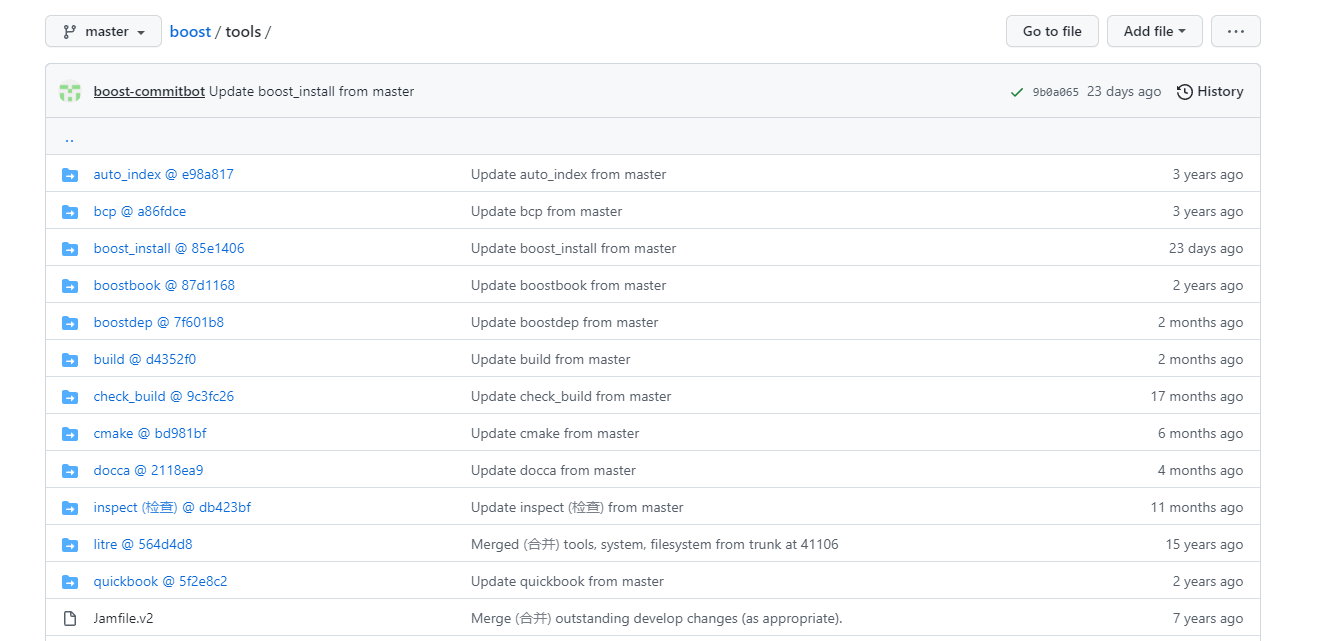
所以造成BUG的原因就清楚了:
boost由下载压缩包改为git clone时没有初始化boost本身含有的子模块造成的bug
可是我们要注意git clone时命令
1
| git clone --recursive --depth=1 https://github.com/boostorg/boost.git boost_1_72_0 -b boost-1.72.0
|
--recursive指在clone的时候循环初始化子模块,所以这个命令是考虑到子模块的问题.
那我为什么会出现这个问题呢?
我仔细回忆了初始化的过程,回想起第一次初始化时曾因为GFW问题导致git clone,所以应该就是在初始化boost下的某一个子模块的时候网络出现了问题,导致后面的子模块没有正常初始化
3.修复
删掉(我的目录)/gitrepos/core/Common/3dParty/boost/boost_1_72_0这个目录,重新执行一遍编译
FUCK GFW